

TV for College Students at UT Austin: Free Channels, Campus Wi-Fi and Cheap Plans
For college students at UT Austin, the cheapest live TV is free. An antenna in a window facing west or northwest picks up ABC 24, home of most 2026 Longhorns games, plus KXAN, CBS Austin and TSTV on 32. For ESPN, SEC Network and the cable channels on a student budget, IPTVZ costs $49.99 for 6 months, enough for a fall semester and the winter break. University Apartments residents also get an Apogee TV service from UT Housing.
Student TV has its own rules. You probably cannot put anything on the roof, your Wi-Fi may want a UT EID before it lets a Firestick online, and two roommates rarely want the same channel at the same time. This guide sorts out what campus already gives you, how to get a streaming stick onto UT's network, and which setup costs the least for a semester, a full school year, or just football season.
Student TV in Austin at a glance
- Free
- Antenna channels, including ABC 24 for most Longhorns games, TSTV on 32, and free station news apps
- From UT Housing
- University Apartments offer Apogee's Stream2 service, signed in with your UT EID, and an Apogee cable package
- Streaming sticks on campus
- UT's utexas-iot Wi-Fi takes devices registered with your EID at network.utexas.edu
- Cheap paid options
- Prime Student $7.49 a month for Thursday Night Football; IPTVZ $49.99 for 6 months
- Roommates
- One IPTVZ login plays on one screen at a time; plans for 2 to 5 screens exist for shared places
What UT Housing already gives you
If you live in the University Apartments, UT Housing and Dining already offers TV through Apogee. Its University Apartments TV page describes two options:
- Stream2, Apogee's internet TV service. You sign in at the MyStream2 portal by choosing the University of Texas at Austin and logging in with your UT EID and Duo, then accept Apogee's video agreement. It includes a 24-hour replay window and 20 hours of recording storage per user.
- Apogee cable, through the wall jack. You bring your own coaxial cable, and the system does not support adding cable boxes or DVRs.
Apogee's support runs around the clock by chat, phone, text and email, per the same page. The channel lineup is in a PDF that UT links from that page, so check it for the networks you care about before paying for anything else. In a residence hall, ask UT Housing and Dining what your building includes, because the University Apartments setup may not apply to you.
Living off campus in West Campus, Riverside or North Campus? Then your building or your internet provider decides, and the options below are yours to mix.
Free TV with an antenna in a dorm or apartment
An antenna still works from a student apartment, as long as the window faces roughly west or northwest. Nearly every Austin station broadcasts from Buckman Mountain and Mount Larson, four to five miles west-northwest of the UT Tower by our calculation, so many apartments around campus are close enough for a small indoor antenna.
- What comes in easily: ABC 24 (KVUE), NBC 36 (KXAN), CBS 42 (KEYE), PBS 18 (KLRU) and The CW 54, all on UHF. ABC alone carries most 2026 Longhorns games.
- The tricky one: FOX 7, the only big Austin network on VHF. A UHF-only flat antenna will likely miss it, so buy one that lists VHF and UHF on the box.
- Where to put it: high in a window facing the West Austin hills. Concrete and metal-tinted windows in newer high-rises can block signals, so try a few spots before giving up.
Our Austin TV stations guide lists every channel and explains why FOX 7 behaves differently, and the Austin channel numbers guide sorts out the subchannels you will find in the scan. If FOX 7 refuses to appear, our guide to antenna reception in Texas explains what a VHF antenna does differently.
TSTV, the student-run station on 32
Channel 32 in Austin is TSTV, Texas Student Television, and UT students run it. The University of Texas at Austin owns the station, K32OJ-D, and the K32OJ-D station record calls it one of only a handful of FCC-licensed TV stations in the country run entirely by students. It first went on the air in 1995.
TSTV broadcasts from a transmitter near campus rather than from the West Austin hills, which helps antennas in nearby dorms and apartments. On UT's campus cable system it appears on channel 15 instead of 32, and the station also streams online. If you want to get involved instead of just watching, student TV is one of the few places at UT where a freshman can end up running a camera on a real broadcast.
Getting a Firestick onto UT's Wi-Fi
A Firestick or smart TV cannot log in to UT's regular Wi-Fi with your EID, so UT offers a separate network for devices like that, called utexas-iot. UT's IT Services describes the process in its utexas-iot help article:
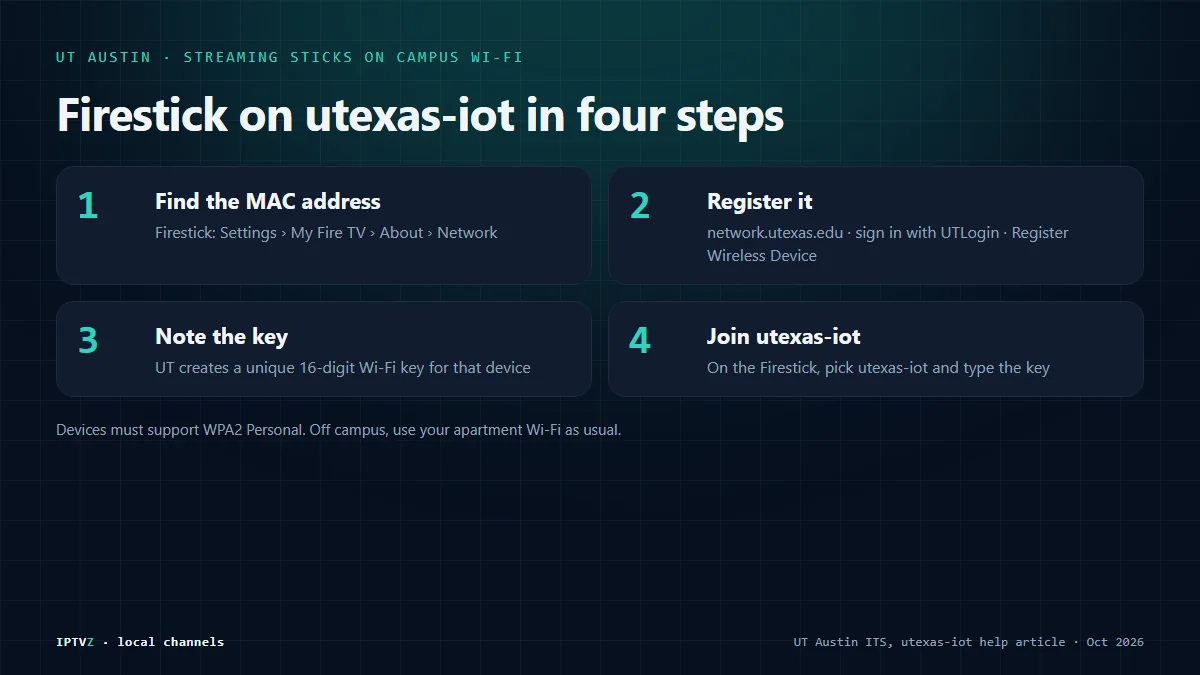
- Find the device's MAC address. On a Firestick, it is under Settings, then My Fire TV, About, Network.
- Register it. On your laptop or phone, go to network.utexas.edu, sign in with UTLogin, choose to register a wireless device, and enter the MAC address and a short description.
- Note the key. UT generates a unique 16-digit Wi-Fi key for that one device.
- Connect. On the Firestick, pick the utexas-iot network and type the key.
The device has to support WPA2 Personal, which current Firesticks and most smart TVs do. UT's article is marked as an older version, so check ITS for the current steps if anything looks different. Off campus, none of this applies: your apartment Wi-Fi works like any home network. Our Firestick setup guide takes it from there.
A semester of TV for college students on a budget
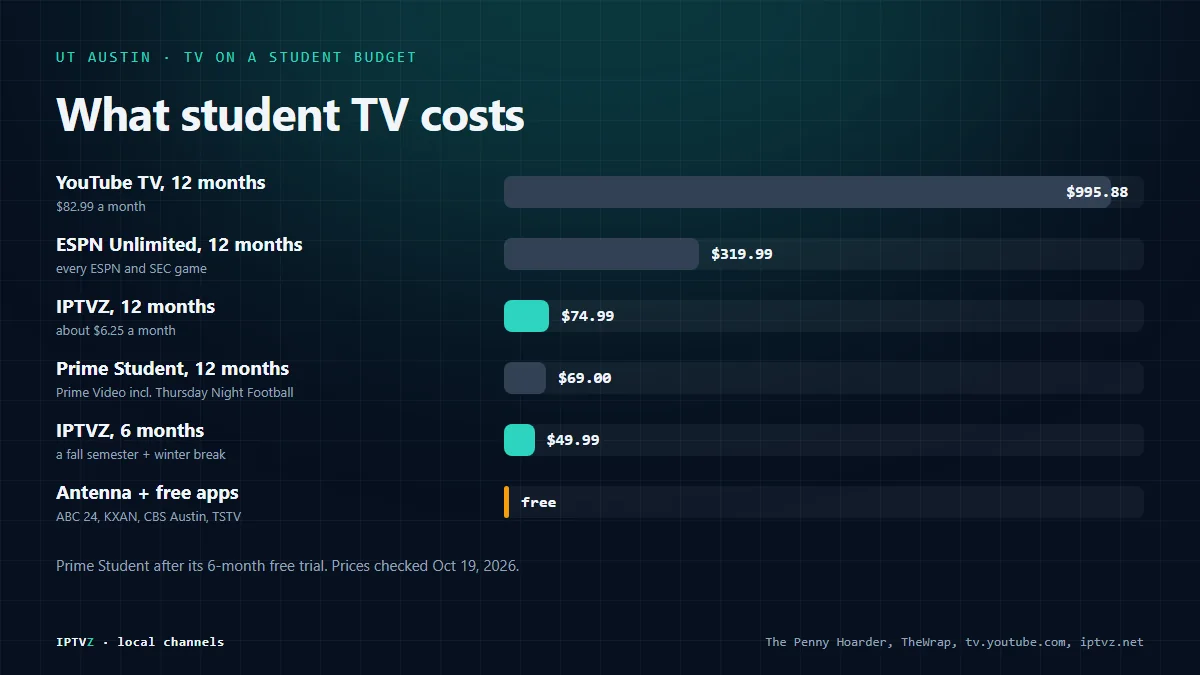
A fall semester at UT runs from late August to mid-December, about four months. That length matters, because it decides which plan is cheapest:
| Setup | Cost | What you get |
|---|---|---|
| Antenna + free apps | Free after the antenna | ABC 24, KXAN, CBS Austin, PBS, TSTV, station news apps, free ad-supported apps |
| IPTVZ, 6 months | $49.99 | Austin locals, ESPN, SEC Network and the cable channels for the semester and winter break |
| IPTVZ, 12 months | $74.99 | The same for the full school year and summer, about $6.25 a month |
| Prime Student | $7.49 a month or $69 a year | Prime Video, including Thursday Night Football, after a 6-month free trial |
| ESPN Unlimited | $31.99 a month or $319.99 a year | Every ESPN and SEC Network game, no other channels |
| YouTube TV | $82.99 a month | Full live TV, about $332 for a four-month semester |
Prime Student prices from The Penny Hoarder, ESPN prices as reported by TheWrap, and YouTube TV from tv.youtube.com, checked October 19, 2026. IPTVZ plans are paid once and never renew automatically, which is handy when you leave Austin in May and forget subscriptions exist.
Our finding: For a four-month fall semester, the 6-month IPTVZ plan at $49.99 costs less than two months of ESPN Unlimited and covers the winter break too. If you stay in Austin over the summer, the 12-month plan at $74.99 comes to about $6.25 a month, the lowest of any option here with live channels.
Test it on your apartment Wi-Fi first
A free 24-hour IPTVZ trial needs only your name and email, no card. Try ABC 24, ESPN and SEC Network on your own screen, then pick 6 months for $49.99 or a full year for $74.99.
Sharing TV with roommates
An IPTVZ login plays on one screen at a time, so two roommates watching different things at once need a plan with two screens. You can install the app on as many devices as you like, the TV in the living room, a laptop, a phone, but only one of them can be playing at any moment. Plans for 2 to 5 screens are available when you order, which can be cheaper per person than everyone buying their own.
A few habits keep a shared setup peaceful:
- Agree on game nights. On a single-screen plan, Saturday belongs to whoever has the remote.
- Put the TV near the router, or connect it with an Ethernet cable. Student buildings are full of competing Wi-Fi networks, and distance makes it worse.
- Split it fairly. A single-screen year of IPTVZ split two ways is under $40 each, less than a single month of most live-TV services.
Sharing a login beyond the screens you pay for just means streams stop each other, so it is not worth the argument.
Longhorns, Austin FC and NFL on a student budget
- Longhorns football: most 2026 games air on ABC, free with an antenna on KVUE 24. The rest are on ESPN, ESPN2, SEC Network or SEC Network+. Our guide to watching the Longhorns in the SEC lists every game and its network.
- Austin FC: there is no separate season pass to buy any more. Apple TV, at $14.99 a month, now includes every MLS match, and you can cancel it once the season ends.
- NFL: Sunday games air on FOX 7 and CBS 42, Sunday night on NBC 36, Monday night on ESPN or ABC 24, and Thursday night on Prime Video, which Prime Student includes. Our cheapest way to watch the NFL guide prices the rest of the season.
IPTVZ carries ABC 24, FOX 7, CBS 42, NBC 36, ESPN, ESPN2, ESPNU and SEC Network, so most of that list sits in one app. Our guide to IPTV in Austin covers the speed and devices you need.
UT student TV FAQ
- Does UT give students free TV?
- University Apartments residents can use Apogee's Stream2 service or Apogee cable through UT Housing and Dining. In residence halls, ask UT Housing what your building includes.
- How do I connect a Firestick to UT Wi-Fi?
- Register the Firestick's MAC address at network.utexas.edu with your UT EID, note the 16-digit key UT generates, and join the utexas-iot network with that key.
- Can I use an antenna in a UT dorm or West Campus apartment?
- Usually yes. Put it high in a window facing west or northwest, toward the towers near Loop 360. Use one rated for VHF and UHF if you want FOX 7.
- What channel is TSTV?
- TSTV, Texas Student Television, is channel 32 over the air in Austin and channel 15 on UT's campus cable system. It also streams online.
- What is the cheapest way to watch the Longhorns as a student?
- An antenna for the ABC games, which are most of the 2026 schedule. For ESPN and SEC Network games too, IPTVZ's 3-month plan costs $29.99 and the 6-month plan $49.99.
- Can my roommate and I share one IPTVZ subscription?
- One login plays on one screen at a time. If you both want to watch at once, choose a 2-screen plan when you order.
- Do I need a contract or a credit check?
- No. IPTVZ plans are paid once for 3, 6 or 12 months and do not renew by themselves, and the trial needs no card.
The short version
- An antenna in a west- or northwest-facing window gets ABC 24, most Longhorns games, and TSTV on 32 for free.
- University Apartments come with Apogee's Stream2 or cable; residence halls vary, so ask UT Housing.
- Streaming sticks join UT Wi-Fi through utexas-iot, after you register them at network.utexas.edu.
- IPTVZ's 6-month plan, $49.99, covers a fall semester and winter break with ESPN and SEC Network.
Start with the free part, then add only what you will actually watch. The free trial shows whether IPTVZ runs well on your Wi-Fi before you spend anything. Rooting for a second team back home? Our Texas sports on TV guide shows where every pro team in the state plays.
Sources
- housing.utexas.edu: University Apartments TV page housing.utexas.edu
- en.wikipedia.org: K32OJ-D station record en.wikipedia.org
- ut.service-now.com: Utexas-iot help article ut.service-now.com
- thepennyhoarder.com: The Penny Hoarder thepennyhoarder.com
- thewrap.com: Reported by TheWrap thewrap.com

Related articles
Discover more
Explore our other guides & insights
From device setup guides to channel overviews: find everything you need to stream smarter.