

IPTV Smarters Pro: How to Download, Log In and Set It Up
Table of contents
- What IPTV Smarters Pro is, and what it isn’t
- Which IPTV Smarters app is the real one?
- IPTV Smarters vs IPTV Smarters Pro
- What IPTV Smarters Pro costs
- How to install IPTV Smarters Pro
- How to log in to IPTV Smarters Pro
- Forgot your login?
- Load the TV guide (EPG)
- What happened to IPTV Smarters Pro?
- IPTV Smarters Pro not working?
- Alternatives to IPTV Smarters Pro
- Using IPTV Smarters Pro with IPTVZ
- IPTV Smarters Pro questions
IPTV Smarters Pro is a free IPTV player app: it shows the live TV, movies and series of the IPTV service you add to it, and comes with no channels of its own. To use it, install the right version for your device, choose Login with Xtream Codes API and enter the details from your provider. This guide walks you through setting it up on each device.
I write our setup guides from real installs, and Smarters is the app I see most often, along with the most confusion about which version is real. This guide sorts that out first, then shows the login screen by screen. IPTVZ doesn’t make Smarters; we use it in our guides because it works on almost every device.
What IPTV Smarters Pro is, and what it isn’t
IPTV Smarters Pro is a player. It doesn’t sell channels, subscriptions or trials of its own. Its developer, Tech Smarters, calls it “strictly a media player app” on smarterspro.com and warns that some websites copy the Smarters name to sell IPTV subscriptions. So a “Smarters Pro subscription” always comes from an IPTV seller using the name, not from the app maker.
The channels come from your IPTV service, which gives you a login: Xtream Codes or an M3U link. Smarters shows them with a TV guide, movies and series. Change the service, and the same app plays different channels.
Which IPTV Smarters app is the real one?
The Smarters apps come from two developers: WHMCS Smarters (iptvsmarters.com) and Tech Smarters Private Limited (smarterspro.com), which publishes the newer Smarters Pro apps with the same app description. Here is what to install, checked in the stores on October 12, 2026, with Firestick, Samsung and LG rechecked on November 5, 2026:
| Device | What to install | Developer |
|---|---|---|
| Android phone or tablet | Smarters Pro - Mobile (Google Play) | Tech Smarters |
| Android TV and Google TV | Smarters Pro (Google Play) | Tech Smarters |
| Firestick | IPTV Smarters Pro with Downloader, using a link from support | WHMCS Smarters |
| iPhone, iPad, Apple TV | Smarters Player Lite or Smarters Pro (App Store) | WHMCS Smarters or Tech Smarters |
| Samsung TV | IPTV Smarters Pro or IPTV Smarters (Samsung Apps), if your TV shows them | WHMCS Smarters |
| Windows or Mac | Smarters Pro beta, from the developer’s website | Tech Smarters |
| LG TV | No official app yet; the developer lists it as coming soon | – |
| Roku | No official app | – |
Watch out for look-alikes. Store searches for “IPTV Smarters Pro” return apps with almost the same name from other developers. When we checked, the Google Play and Microsoft Store listings titled “IPTV Smarters Pro” that rank highest in Google came from other developers. Always check the developer name before you install. On November 1, 2026, a US App Store search for “Smarters” also returned “Smarters IPTV Pro”, “IPTV Smarters Pro - Live & VOD” and “IPTV Smarters・Smart TV Player”, all from unrelated developers.
IPTV Smarters vs IPTV Smarters Pro
They are versions of the same player. IPTV Smarters Pro is the fuller, newer one, with live TV, movies, series and a TV guide in one menu. On Samsung TVs both are listed; either works with an Xtream Codes login.
What IPTV Smarters Pro costs
Nothing to download. Some versions sell an optional Premium upgrade: $1.99 once for Smarters Player Lite and $4.99 for Smarters Pro on the US App Store; the Android apps list in-app purchases. The channels are a separate thing: they come from your IPTV service.
How to install IPTV Smarters Pro
- Android, Android TV and Google TV: install Smarters Pro from Google Play; the Android guide has every step.
- Firestick: Smarters isn’t in the Amazon Appstore, so it needs the free Downloader app; the Firestick guide shows each screen. On November 5, 2026, smarterspro.com listed no Firestick download and iptvsmarters.com didn’t load, so ask our support team for a current link, or use TiviMate. The Fire TV Stick 4K Select can’t install it, because it only takes Appstore apps.
- iPhone, iPad and Apple TV: install Smarters Player Lite from the App Store; see the Apple TV and iPhone guide.
- Samsung TV: look for IPTV Smarters Pro in Samsung Apps, but that listing dates from 2023. Tech Smarters says an updated app is waiting for store approval and offers a USB install for existing users until then. See the Samsung and LG guide.
- Windows and Mac: Tech Smarters offers beta builds on its website. Microsoft Store listings named “IPTV Smarters Pro” come from other developers, so check before you install. For a quick test, VLC plays your M3U link.
- LG TV: the developer lists its LG app as coming soon. Until then, pick a player from the LG Content Store; our Samsung and LG guide shows how.
- Roku: there is no official Smarters app for Roku. Roku only installs apps from its own store, and we couldn’t trace the listings there with “Smarters” in the name to the developer. Our Roku guide covers what works.
- APK files: on Android, install from Google Play. If you sideload, take the file only from the developer’s own website. “Mod” or “premium unlocked” APKs from mirror sites can carry malware.
Downloader codes: we don’t publish them, because codes on random websites can point to unofficial files. Ask our support team for the current link.
How to log in to IPTV Smarters Pro
Your login comes from your IPTV provider, not from Smarters. IPTVZ sends it in your welcome email (or trial email): a server URL, a username and a password. Still choosing a provider? Here is how to choose an IPTV service in the USA.
- Open the app and accept the terms of use.
- Choose Login with Xtream Codes API.
- Enter any name (for example “IPTVZ”), then your username, password and the server URL exactly as in the email, including http:// and the port number if there is one.
- Select Add user and wait a minute while the channels load.
- Open Live TV, Movies or Series.
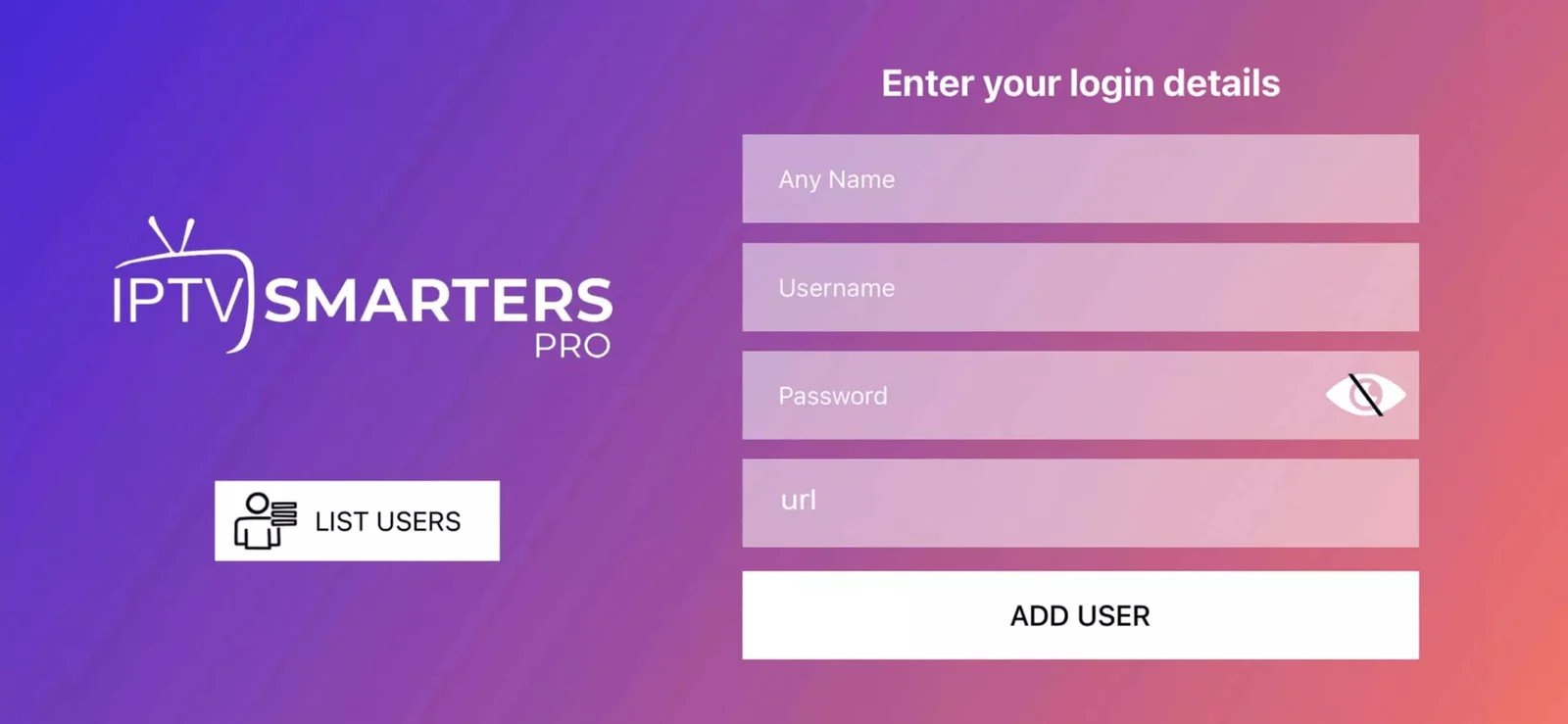
The username and password are case-sensitive. Most “invalid login” or “invalid server URL” errors come from one wrong character or a missing http://. If your provider only gave you an M3U link, choose the playlist option instead and paste the link.
Forgot your login?
There is no Smarters account to recover. Ask your provider to resend your details; IPTVZ support does this 24/7 by live chat and email.
Load the TV guide (EPG)
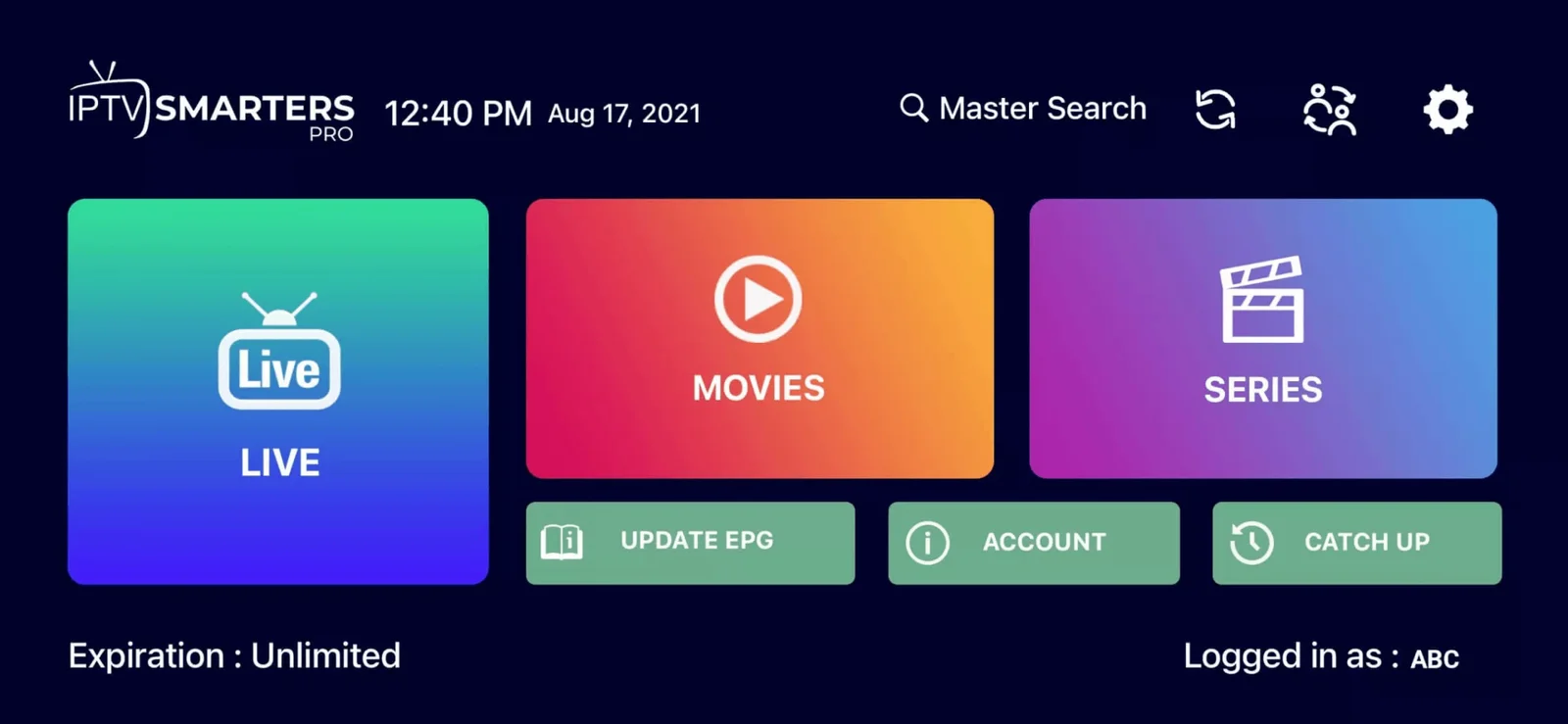
Select Update EPG on the dashboard (some versions say Install EPG), or refresh it from the settings. The first load can take 5 to 15 minutes. IPTVZ has guide data for 1,600+ US channels; if times are off by a few hours, set your device’s clock to automatic and refresh.
What happened to IPTV Smarters Pro?
Two things confuse people. First, store removals: Google pulled IPTV Smarters from Google Play after a copyright complaint on October 7, 2019, its third removal, and put it back within three weeks after the developer showed it hosts no content (TorrentFreak, October 2019).
Second, new names. On Google Play and the App Store, the current apps are Smarters Pro from Tech Smarters and Smarters Player Lite from WHMCS Smarters, while Firestick owners still install IPTV Smarters Pro with Downloader. If your old app disappeared, the newer one takes the same login.
IPTV Smarters Pro not working?
- Login fails: retype the server URL, username and password, and check that your plan is active.
- The app closes or freezes: clear its cache, update it or reinstall it, and restart the device.
- Every channel buffers: check your Wi-Fi first; a cable or 5 GHz Wi-Fi fixes most cases. Our IPTV buffering fixes cover the rest.
- Still stuck: try the same login in another player. If that works, the problem is the app.
The full checklist is in our IPTV troubleshooting guide.
Alternatives to IPTV Smarters Pro
On Firestick and Android TV, TiviMate has a cable-style channel grid. On Android phones, XCIPTV is free with ads. On Apple TV, UHF and IPTVX are the usual alternatives. Our best IPTV app guide compares them by device.
Using IPTV Smarters Pro with IPTVZ
Every IPTVZ plan includes an Xtream Codes login that works in IPTV Smarters Pro, with live TV, movies, series and the TV guide. Try it in the app with the free trial, or compare plans and prices.
IPTV Smarters Pro questions
- Is IPTV Smarters Pro free?
- Yes. The Smarters apps are free to download. Some versions sell an optional Premium upgrade, such as $1.99 for Smarters Player Lite on iPhone. The app has no channels; you add your IPTV provider’s login.
- How do I log into IPTV Smarters Pro?
- Open the app, choose Login with Xtream Codes API, then enter any name, your username, your password and the server URL from your provider’s welcome email, and select Add user.
- How can I recover my Smarters Pro password?
- There is no Smarters account to recover. The username and password come from your IPTV provider, so ask them to resend your login; IPTVZ support does this 24/7.
- Is there a difference between IPTV Smarters and IPTV Smarters Pro?
- They are versions of the same player. IPTV Smarters Pro is the fuller, newer one; on Samsung TVs both are listed, and either works with an Xtream Codes login.
- How do I get IPTV Smarters on my Firestick?
- It isn’t in the Amazon Appstore, so it needs the free Downloader app and a link from our support team: neither developer site offered a Firestick download when we checked on November 5, 2026. This doesn’t work on the Fire TV Stick 4K Select, which only installs Appstore apps.
- What is the download code for IPTV Smarters Pro?
- We don’t publish Downloader codes: codes on random websites can point to unofficial files. Ask our support team for the current link.
- Does IPTV Smarters Pro come with channels?
- No. It is a player only. The channels, movies and TV guide come from the IPTV service you sign in to.
- Is IPTV Smarters Pro legal in the USA?
- The app is a legal media player. Whether a particular IPTV service is legal depends on whether it has the rights to what it streams; our guide explains what US law says about IPTV.
- What happened to IPTV Smarters Pro?
- It was removed from Google Play after a copyright complaint in October 2019 and returned within three weeks. Since then the store apps have new names: Smarters Pro from Tech Smarters and Smarters Player Lite from WHMCS Smarters. Your IPTV login works in either.
- Is the IPTV Smarters Pro APK safe?
- The APK from the developer’s own website is the safe one; on Android, Google Play is safer still. “Mod” or “premium unlocked” APKs from mirror sites can carry malware, so skip them.
- Is IPTV Smarters Pro on Roku?
- No. There is no official Smarters app for Roku, and Roku only installs apps from its own store. A Fire TV Stick or Google TV device in a free HDMI port is the simplest way to use Smarters on a Roku TV.
- Is there IPTV Smarters Pro for Windows?
- Yes, as a beta. Tech Smarters offers Windows and Mac builds on its own website. Microsoft Store listings with the same name come from other developers, so check the developer before you install.

 Apps & logins
 Apps & logins

Discover more
Explore our other guides & insights
From device setup guides to channel overviews: find everything you need to stream smarter.