

How to Set Up TiviMate: Install, Log In and Premium Explained
TiviMate is a free IPTV player for Android TV and Fire TV with a cable-style channel guide. Install it from Google Play or with Downloader (the official code is 272483), add your Xtream Codes login and let the guide load. Premium is optional.
I write our setup guides from real installs, and TiviMate is the player I reach for on a TV: the guide looks like cable, so nobody in the house needs a lesson. This page covers the install, the login, the TV guide and what Premium really is.
Good to know: IPTVZ doesn’t make TiviMate and has no link to its developer. App facts below come from tivimate.com, its terms of use and Google Play, checked on October 12, 2026.
What you need
- An Android TV, Google TV or Fire OS device: a Fire TV Stick, a Google TV Streamer, an onn box, an NVIDIA Shield or a TV with Google TV built in. TiviMate says it isn’t optimized for phones and tablets, and it doesn’t run on iPhone, Apple TV, Samsung or LG TVs.
- Not the Fire TV Stick 4K Select: it runs Vega OS and only installs Appstore apps.
- Your IPTVZ login: the server URL, username and password from your welcome email. No account yet? Start the free 24-hour trial.
Step 1: Install TiviMate
Install TiviMate on Android TV and Google TV
Open Google Play, search for TiviMate and install TiviMate IPTV Player from Armobsoft FZE. Google Play listed 5M+ downloads.
Install TiviMate on a Firestick (Downloader code 272483)
- Install the free Downloader app from the Amazon Appstore.
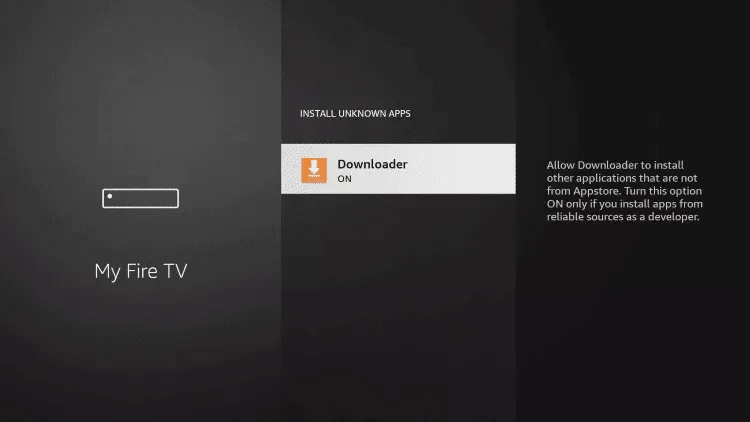
- Allow it to install apps: Settings, My Fire TV, Developer options, Install unknown apps, then turn on Downloader.
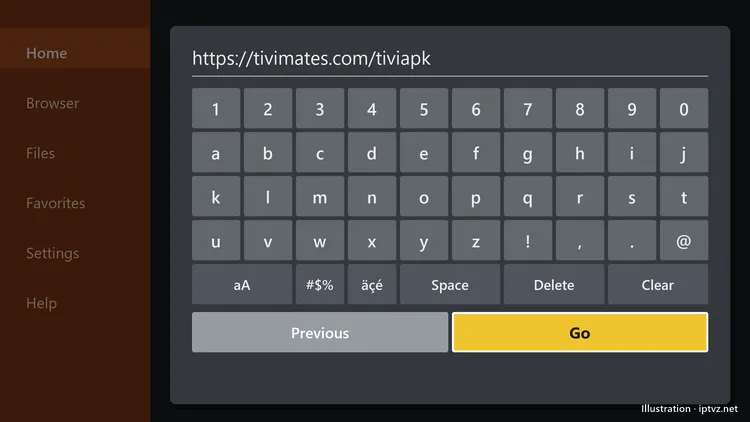
- Open Downloader and enter the code 272483 or the address tivimate.com/apk, both published on TiviMate’s website, then select Go.
- Select Install, then Done, and delete the installer file when Downloader offers.
Developer options missing? Our Firestick guide shows how to turn them on, screen by screen.
Step 2: TiviMate login: add your IPTVZ playlist (Xtream Codes)
- Open TiviMate and select Add playlist.
- Choose Xtream Codes.
- Enter the server address, username and password exactly as in your email, including http:// and the port number if there is one, and select Next.
- Give the playlist a name, such as “IPTVZ”, and select Done.
Your TiviMate playlist always comes from your IPTV provider. Only have an M3U link? Choose Enter URL instead, paste the link, and add the EPG link from your email for the guide. Xtream Codes is easier: it brings the guide, movies and series in one step.
Your TiviMate account vs your IPTV login
People mix these up. The IPTV login comes from your provider and loads the channels. The TiviMate account, which you can sign up for on tivimate.com, is only for managing a Premium purchase. Neither one includes channels from TiviMate.
Step 3: Load the TV guide
With an Xtream Codes login the guide loads by itself; to refresh it, go to Settings, EPG, Update EPG. The first load can take 5 to 15 minutes. IPTVZ has guide data for 1,600+ US channels; PPV event slots and 24/7 channels have none.

TiviMate Premium: what it costs and what it adds
TiviMate’s terms of use say it offers a one-time lifetime purchase and auto-renewing subscriptions, with the plans and prices shown at the point of purchase. You can buy through the app store or on tivimate.com. App store purchases follow that store’s refund policy; purchases on TiviMate’s website are final, with refunds only case by case.
Premium unlocks app features such as recording and multiple playlists; it never includes channels, as TiviMate itself points out.
Is TiviMate Premium worth it? If you want to record shows or switch between playlists, yes. If you just want live TV with a good guide, start with the free version and decide later.
TiviMate not working?
- Can’t add the playlist: check each character of the login, that your plan is active, and that you chose Xtream Codes, not M3U.
- Playlist won’t update: update it from Settings, Playlists, or remove it and add it again.
- Buffering: use a cable or 5 GHz Wi-Fi, then raise the buffer in Settings, Playback, Buffer size.
- Won’t install on a new Fire TV: check whether it’s the 4K Select.
More fixes are in our IPTV troubleshooting guide.
Alternatives to TiviMate
IPTV Smarters Pro is simpler and has one menu for live TV, movies and series; see our IPTV Smarters Pro guide. On Apple TV, use UHF or IPTVX. Our best IPTV apps guide compares them all.
TiviMate questions
Can I use TiviMate without a subscription?
Yes. TiviMate is free to install and use; Premium is an optional upgrade for extra features. Either way you need a playlist or login from an IPTV provider, because TiviMate comes with no channels.
What is the Downloader code for TiviMate?
TiviMate’s own website gives the Downloader code 272483, or the address tivimate.com/apk. Codes from other websites can point to unofficial files.
How much does TiviMate Premium cost?
TiviMate offers a one-time lifetime purchase and auto-renewing subscriptions. Its terms say the plans and prices are shown at the point of purchase, so check the app or tivimate.com for today’s price.
Does TiviMate offer a lifetime subscription?
Yes. According to its terms of use, TiviMate sells a one-time lifetime purchase with no recurring charges, as well as subscriptions that renew automatically.
Is Firestick blocking TiviMate?
Amazon blocks apps it identifies as piracy apps. TiviMate is a media player whose developer says it provides no content, and it installs on Fire OS devices with Downloader. It can’t install on the Fire TV Stick 4K Select, which only takes Appstore apps.
Can I use TiviMate on my phone or iPhone?
TiviMate says it is built for Android TV devices and isn’t optimized for phones and tablets, and there is no iPhone or Apple TV version. On those, use IPTV Smarters, UHF or IPTVX.
Where do I get a playlist for TiviMate?
From your IPTV provider: an Xtream Codes login or an M3U link. Free playlists shared online often carry channels without permission and stop working without warning.
Is TiviMate legal?
Yes, TiviMate is a legal media player. Whether a particular IPTV service is legal depends on whether it has the rights to what it streams; our guide explains what US law says about IPTV.