

Xtream Codes and M3U Explained: How IPTV Logins Work
Table of contents
- What is Xtream Codes?
- The three IPTV login types
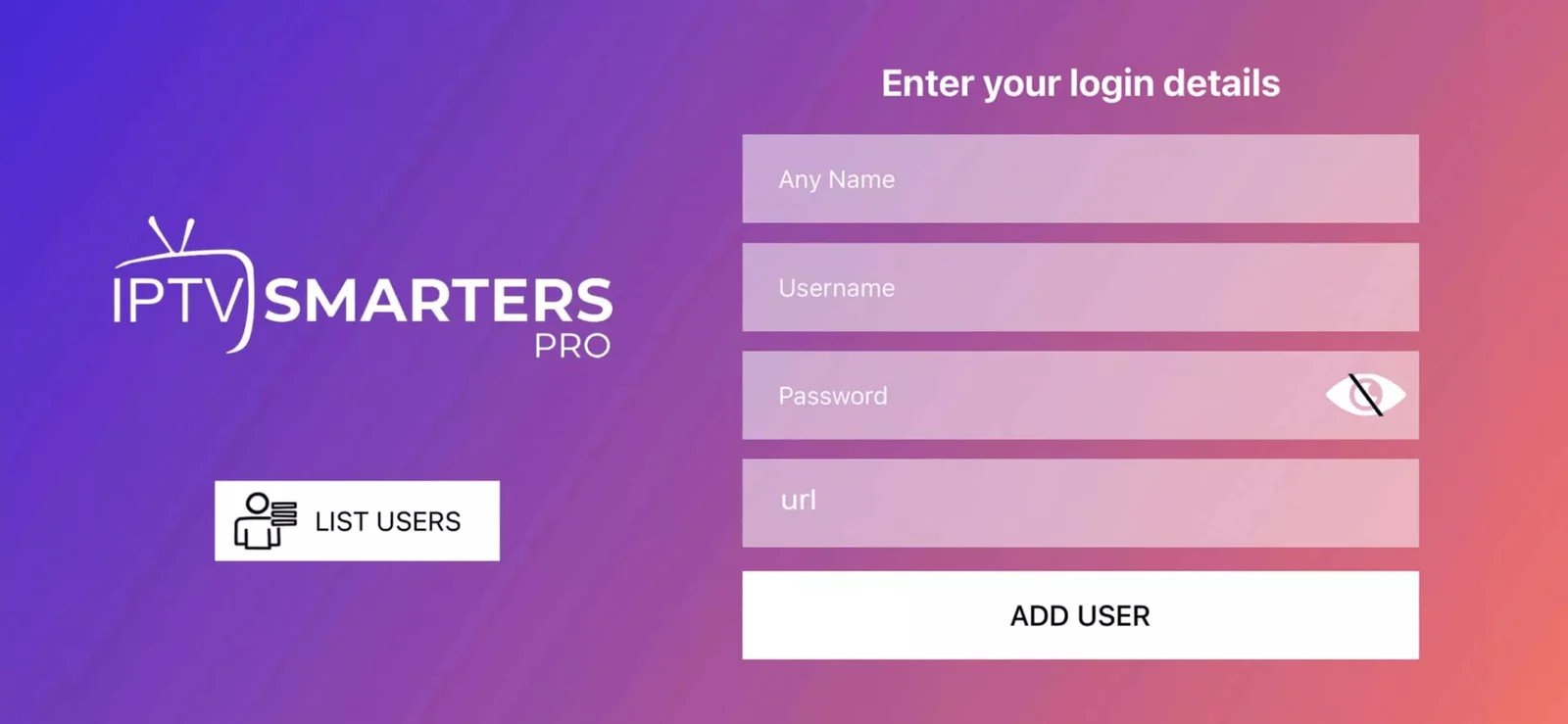
- What an Xtream Codes login looks like
- What is an M3U URL?
- Where to find your IPTV M3U URL
- How to change the URL in your player
- What is an EPG URL?
- Why your IPTV EPG isn’t loading
- How to enter your login in popular players
- Xtream Codes login not working?
- What about free Xtream codes and M3U playlists?
- Parental controls and locked channels
- Your IPTVZ login
- Xtream Codes and M3U questions
An Xtream Codes login is three details from your IPTV provider: a server URL, a username and a password. You type them into a player app such as TiviMate or IPTV Smarters Pro, and it loads your live channels, movies, series and TV guide in one step. An M3U link does the same job as one long web address. Both are explained below, with examples.
I write our setup guides from real installs, and most “IPTV doesn’t work” calls I see end at the login screen. This guide explains the three login types, where to find yours, how to type them in and how to fix the usual errors.
What is Xtream Codes?
Xtream Codes started as a software company. It made management panels that IPTV services used to run their streams and customer accounts; it never sold TV channels itself. In September 2019, Italian police took its service offline in a raid on illegal streaming (Telecompaper). In 2021, an Italian court found no evidence that Xtream Codes Ltd itself had acted unlawfully, according to a report on the ruling (TorrentFreak).
The name stuck around for a different reason. The way those panels handed out logins became a standard, often called the Xtream Codes API or “Xtream Codes compatible API”. When a player app asks for an “Xtream Codes” or “Xtream IPTV” login today, it means that format, not the old company. So if you search for “Xtream Codes IPTV”, what you need is simply that login from your provider.
The three IPTV login types
| Login type | What you get | TV guide | Works in |
|---|---|---|---|
| Xtream Codes | Server URL, username, password | Loads by itself | Most players |
| M3U link | One long playlist link | Needs an EPG link | Almost any player, even VLC |
| MAG portal | A portal URL tied to your MAC address | Built in | MAG boxes |
Which is better? Use Xtream Codes whenever your app offers it. It brings live TV, movies, series and the guide in one go, and it shows when your plan expires. Use an M3U link only for players that can’t take that login. MAG portals are only for MAG boxes and apps built around the MAC address.
What an Xtream Codes login looks like
Your IPTV Xtream Codes login arrives looking something like this (these are made-up examples):
- Server URL: http://tv.example.com:8080
- Username: jsmith4821
- Password: k7Qp2xR9
Three details trip people up:
- The port. The number after the colon (:8080 here) is part of the address. Leave it out and the app can’t connect.
- http:// or https://. Type the server URL exactly as sent, including the beginning.
- Capital letters. Usernames and passwords are case-sensitive, and a space copied from an email is enough to break them.
What is an M3U URL?
M3U is a plain-text playlist format: a list of channel names and their stream addresses. An IPTV M3U playlist from your provider holds all your channels. An M3U URL is the web address of your personal playlist. You paste it into a player as an “M3U playlist” or “playlist URL”.
Where to find your IPTV M3U URL
Look in your provider’s welcome email or customer area. On many Xtream Codes compatible servers, the M3U link follows a pattern built from your login, often like this:
http://tv.example.com:8080/get.php?username=jsmith4821&password=k7Qp2xR9&type=m3u_plus&output=ts
Not every server supports that pattern, so always use the exact link your provider gives you. It’s personal: anyone with it can use your connections, so don’t share it.
How to change the URL in your player
If your provider gives you a new server address, edit the playlist or user in the app’s settings and replace the server URL, or delete it and add it again. Your username and password usually stay the same.
What is an EPG URL?
Does IPTV have a channel guide? Yes. The IPTV EPG (electronic program guide) is the TV guide grid: what’s on now and next on each channel. It comes as a separate XMLTV file. With an Xtream Codes login, the player fetches it by itself. With an M3U link, you add an EPG URL in the player’s EPG settings. The IPTVZ login email doesn’t include one, so use the Xtream Codes login or ask our support team. On many Xtream Codes compatible servers it looks like http://tv.example.com:8080/xmltv.php?username=…&password=….
Why your IPTV EPG isn’t loading
- It’s still downloading. The first load takes 5 to 15 minutes; leave the app open.
- You used an M3U link without an EPG URL. Switch to the username-and-password login, which brings the guide with it.
- Times are off by hours. Set the device’s date, time and time zone to automatic.
- Some channels have no guide. PPV event slots and 24/7 channels have no fixed schedule. IPTVZ has guide data for 1,600+ US channels.
How to enter your login in popular players
| Player | Where to enter Xtream Codes |
|---|---|
| TiviMate | Add playlist, then Xtream Codes (TiviMate guide) |
| IPTV Smarters Pro | Login with Xtream Codes API (Smarters guide) |
| UHF and IPTVX | Add a playlist, choose Xtream Codes (Apple TV guide) |
| MyTVOnline (Formuler) | Add content source, Xtream Codes API (Formuler guide) |
| MAG box | No Xtream Codes: portal URL in System Settings, Servers, Portals (MAG guide) |
Every device has a step-by-step guide in our IPTV setup guide, and our best IPTV apps guide shows which player suits which device.
Xtream Codes login not working?
- “Invalid username or password”: retype both; check capital letters and hidden spaces.
- “Can’t connect to server” or “invalid server URL”: check the http://, the full address and the port number.
- “Account expired”: the plan ended; it won’t work again until it’s renewed.
- “Max connections reached”: more screens are playing than your plan allows.
- Nothing happens after login: you may have pasted an M3U link into the username-and-password form. Use the matching option.
More fixes are in our IPTV troubleshooting guide.
What about free Xtream codes and M3U playlists?
Searches for “free Xtream codes” lead to lists on code-sharing sites and document uploads. Those logins are usually leaked or unlicensed accounts. They stop working without warning, and they can expose your device to unofficial apps. Real logins come from the provider you sign up with. If you want to test before you pay, use a provider’s free trial; for free live TV with no login at all, ad-supported services such as Pluto TV and Tubi are legal. Our guide explains whether IPTV is legal in the USA. For what to check before you sign up, read how to choose an IPTV service in the USA.
Parental controls and locked channels
Channel locks live in the player, not in your login. In TiviMate and IPTV Smarters Pro, open the settings and look for Parental control to set a PIN or choose which groups are locked. Forgot the PIN? Clearing the app’s data or reinstalling it resets it; you then add your login again.
Your IPTVZ login
Every IPTVZ plan comes with an Xtream Codes login, an M3U link and, for MAG boxes, a portal URL, all in your welcome email. You can try them in your favorite player with the free trial, then compare plans and prices. New to IPTV? Start with what IPTV is and how it works.
Xtream Codes and M3U questions
- What does “Xtream Codes” mean in an IPTV app?
- Today it usually means a login format, the Xtream Codes API: a server URL, a username and a password that a player app uses to load channels, movies, series and the TV guide. The name comes from a software company that made management panels for IPTV services.
- Is Xtream Codes still working?
- The original company’s service went offline after a 2019 raid in Italy, but the login format lives on. Many IPTV services and players use an Xtream Codes compatible API, and that is what apps mean by that login.
- Is Xtream Codes better than M3U?
- For most people, yes. One login brings live TV, movies, series and the guide. An M3U link is one long address that usually needs a separate EPG link for the guide, and it can’t refresh your account details by itself.
- Where is my M3U URL?
- In the welcome email from your IPTV provider, or in its customer area. If you only have a username and password, ask your provider for the M3U link rather than building one yourself.
- Which IPTV players support Xtream Codes?
- TiviMate, IPTV Smarters Pro, XCIPTV, UHF, IPTVX and Formuler’s MyTVOnline all accept Xtream Codes logins. Our IPTV player comparison covers them device by device.
- Is there a free code for Xtream IPTV?
- Not a legitimate one. Real logins come from the provider you sign up with. Lists of free Xtream codes shared online are usually leaked or unlicensed accounts that stop working quickly. Many providers, including IPTVZ, offer a free trial instead.
- How do I get my EPG to work on IPTV?
- Use an Xtream Codes login if you can; the guide then loads by itself. With an M3U link, the guide needs a separate EPG link that isn’t in the IPTVZ login email, so switch to Xtream Codes or ask support. Then wait 5 to 15 minutes and set your device clock to automatic.
- Is Xtream Codes legal?
- Xtream Codes is a login format, and the format itself is just technology. Whether a particular IPTV service is legal depends on whether it has the rights to what it streams; our guide explains what US law says about IPTV.
Sources

 Apps & logins

Discover more
Explore our other guides & insights
From device setup guides to channel overviews: find everything you need to stream smarter.