

EPG Sources and URLs: How to Add a TV Guide in TiviMate and Smarters
Your IPTV app needs a guide source to fill the grid. Most of the time your service provides it, and you never see it. When it doesn't, you need an EPG URL. This guide explains what an EPG source is, the three kinds you can use, how to add one in TiviMate and IPTV Smarters, and why a free source so often leaves your channels empty.
Who wrote this: IPTVZ sells IPTV. We don't sell guide data, we don't link to or name third-party guide sites, and we earn nothing from them. App menus change between versions, so if a label differs from what you see, look for the nearest match. We read public Reddit threads without an account.
The short answer: an EPG source is a link to your guide data, and your service's own link comes first
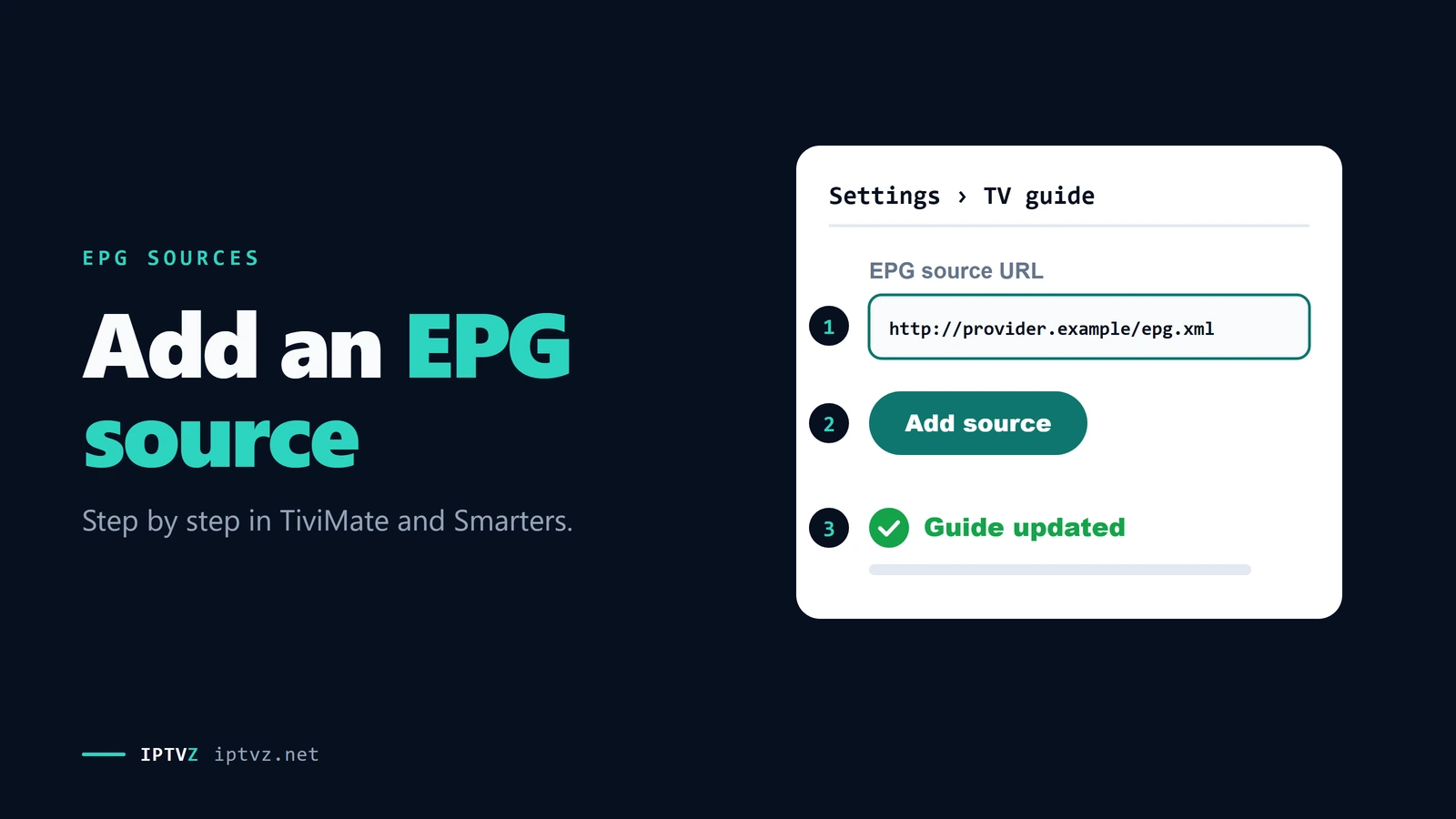
An EPG source is a web address, usually called an EPG URL, that points to a file of TV listings in a format called XMLTV. With a username-and-password login, most apps get it automatically. With an M3U link, you paste the EPG URL into the app's EPG settings. Use the link from your IPTV service first, because its channel IDs already match your list. Add a free or paid source only to fill gaps, and expect to assign some channels by hand.
The key point
A guide link only helps if it matches your channels. More sources don't mean more listings when the channel IDs are different.
This guide is part of our series on what a good IPTV TV guide looks like. If your guide stopped working, go to how to fix an EPG that isn't loading.
What an EPG URL is
An EPG URL is the address your app visits to download the guide. It points to an XMLTV file, a text format that lists channels and their programs with start and end times. It may end in .xml, or in .gz if the file is compressed to save time. On many Xtream Codes servers, it looks like this, with your own details:
http://tv.example.com:8080/xmltv.php?username=…&password=…
Two things matter. It's a live link, not a file to save: the data changes every day. One Reddit user who downloaded the file and loaded it by hand saw the guide die after a couple of days, and the reply was blunt: "You have to put the URL". And if the link contains your username and password, treat it like a password.
The three kinds of EPG source
| Source | Cost | Channel matching | Best for |
|---|---|---|---|
| Your IPTV service | Included | Already matched | Everyone; start here |
| Free public guide files | Free | Often partial; some channels by hand | Filling gaps, by country |
| Paid guides and playlist editors | Small yearly fee or more | Built for specific services or edited by you | Very large lists |
We don't link to third-party guide sites, because they come and go, and we can't vouch for them. Reddit users reported one popular free source shutting down in 2026, which emptied guides overnight. To find free files, search for "XMLTV" with your country, and check that the file was updated recently. Open the link in a browser first. As one user put it, if "the browser downloads it you know the URL is ok".
We counted what Reddit users recommend. In 10 threads asking which source to use, 27 of 57 answers named a free source, 18 a paid guide or playlist editor, and 12 said to use the service's own guide or get a better service. One free user reported a guide that was "99 percent complete", so free can work. It just takes more effort.
Add an EPG source in TiviMate
TiviMate is only a player, so the data has to come from your service or a source you add. If you signed in with an Xtream Codes login, the guide normally loads by itself and you can skip this. These steps are for an M3U playlist or a second source. Our Xtream Codes and M3U guide explains the logins.
What happens when you add an EPG URL
- Open the EPG settings
Go to Settings, then EPG, then EPG sources, and choose Add source at the bottom of the list. Paste your EPG URL.
- Connect it to your playlist
Go to Settings, then Playlists, select your playlist and open its EPG sources. Make sure the new source is switched on. A source that isn't connected does nothing.
- Update the EPG
Run an update and wait. Users on Reddit suggest updating the EPG first and then the playlist, in that order.
- Assign leftover channels
For a channel that still shows no information, long-press it and choose the EPG option, then pick the right listing. It's slow, so do it only for channels you watch.
- Set the order if you use several sources
Put the source that covers the most channels first, and use the others to fill gaps. The user who ran 7 sources didn't have to map a single channel, but a second user pointed out that they can clash.
Load the guide in IPTV Smarters
IPTV Smarters is simpler, with fewer options. After you sign in, choose Update EPG on the dashboard. Some versions call it Install EPG. You can also refresh it from the settings. The first load can take 5 to 15 minutes, so leave the app open. If the times are off by a few hours, set your device's clock to automatic and refresh. Our IPTV Smarters Pro guide covers the rest of the setup.
Why channels stay empty even with a source
This is the part that catches people out. An app doesn't read a channel's name the way you do. In an M3U playlist, each channel has an ID, and the guide file has its own IDs. If they match, the listings appear. If they don't, the channel shows "no information", even if the guide contains that exact channel.
Why a listing needs a matching ID
That's why a free source can load thousands of listings and fill almost nothing. One user tried several free sources, then paid for a guide built for that exact provider, and wrote that the free ones "didn't match with my provider playlist". As another user explained: "The reason you have to manually match is because your playlist naming convention doesn't match you epg naming list."
So before you add a fifth source, check the basics. Is the source right for your country? Is it connected to the playlist? Are you sure the channel has a schedule? A 24/7 channel won't have one anywhere, and neither will a PPV slot. In our US lineup, 1,623 of 1,625 regular channels have guide data, while the 4,313 entries in 24/7 categories and PPV have none.
Keep your login safe
- Treat a provider's guide URL as private. If it contains your username and password, don't post it in a forum or paste it into a site you don't trust.
- Think before giving a third-party tool your login. Playlist editors and some paid guides ask for your IPTV details so they can read your list. Use only tools you've checked, and know that your service may not support them.
- Don't install anything to get a guide. A guide is a link. If a site wants you to install an app to get one, walk away.
- A guide isn't a channel list. Guide data contains schedules, not streams. Be careful with sites that offer both, and see our guide to public IPTV playlists.
Using a guide with IPTVZ
With IPTVZ, sign in with the username and password from your login email, and the guide loads by itself. Our login email doesn't include a separate EPG URL, so if your device only takes an M3U link, ask our support team by live chat or email. Guide data covers 1,623 US channels in our October 7, 2026 list, and you can filter for them on our channels page. You can see all this for yourself in a free trial.
People also ask
These are the questions Google showed for "EPG URL", "XMLTV" and "TiviMate EPG" on November 5, 2026 (US settings, results not personalized). Each one gets a straight answer first.
What is the best EPG URL for TiviMate?
The one from your IPTV service, because its channel IDs already match your playlist. If you signed in with an Xtream Codes login, TiviMate normally uses it automatically. Add another source only for the channels it misses, and pick one for your country.
What is a playlist EPG url?
It's the guide link that goes with an M3U playlist. Some playlists carry it inside the file, and others need you to paste it into the app. Without it, your channels play but the guide stays empty.
What is an XMLTV file?
It's a text file of TV listings: channels, program titles, descriptions and start and end times. Most IPTV apps can read it. It usually sits at a web address, so the app can download a fresh copy, and it may be compressed as a .gz file.
Where can I find a free XMLTV file?
Search for "XMLTV" with your country; several community projects publish free files. Check that the file is recent by opening the link in a browser. Free files often need some channels assigned by hand, and they can vanish without warning, so don't rely on just one.
How to install EPG on TiviMate?
Go to Settings, then EPG, then EPG sources, and add your URL. Then open your playlist's settings, make sure the source is switched on, and run an update. With an Xtream Codes login, you usually don't need to do anything.
How do I update the EPG in TiviMate?
Open the EPG settings and run an update, or let it refresh on its schedule. If it fails, check the URL in a browser and see whether your service's guide is down. Some services limit how often you can update.
Is the XMLTV EPG URL optional?
Yes. Your channels will play without it, but you won't have a guide. With a username-and-password login, you usually don't need to enter one. With an M3U link, you do if you want a guide.
More questions about EPG sources
Can I use more than one EPG source?
Yes, in apps that allow it. Put the best one first and use the others to fill gaps. Too many sources slow updates and can clash.
Is it legal to use a free EPG?
A guide is schedule data, not TV channels, so it's a different question from the streams themselves. Who owns listings varies, and we aren't lawyers. Our guide on whether IPTV is legal covers the streams.
Why does my EPG URL not work in a browser?
Either the link is wrong, your login has expired, or the source is down. If it downloads a file, the link is fine, and the problem is in the app or your settings. Compressed files download instead of opening.
Do paid EPG services work with every provider?
No. Some are built for specific services, and others are general tools that you have to set up. Check before you pay, and remember that a good included guide makes them unnecessary.
Does IPTVZ give an EPG URL?
The guide comes with the username-and-password login, so most people never need one. Our login email doesn't include a separate URL. If your device needs one, ask support.
Sources and data
- IPTVZ, 43 public Reddit threads about IPTV guides, read without an account on November 5, 2026; 57 top-level answers in 10 threads on which guide source to use coded by hand. Users quoted without usernames; no sellers or guide sites named.
- IPTVZ US channel lineup, October 7, 2026: guide data by channel, as published on our channels page.
- IPTVZ, Google results and "People also ask" questions for "EPG URL", "XMLTV" and "TiviMate EPG", US settings, collected November 5, 2026.
- IPTVZ keyword research: Semrush US data for EPG source searches, collected November 5, 2026.
Test it on your own TV
Which IPTVZ plan is right for you?
Both plans carry the same channels, movies and sports, with the same 48-hour money-back guarantee. Pick one and order right here.
Standard
- 19,000+ live channels, including 830 US local stations
- 80,000+ movies & series on demand
- NFL, NBA, MLB, NHL & PPV events
- 24/7 support by chat & email
$29.99
$10.00/mo · billed once
VIP
- Everything in Standard, plus:
- Free Hot Player or EBO Player activation for 1 year
- Premium Server
- Faster, priority support
$44.99
$15.00/mo · billed once
Not ready to buy? Start a free trial, no credit card needed.
- 48-hour money-back guarantee for technical issues
- Pay by card, crypto, bank transfer, Cash App and more
- Up to 5 devices and plans up to 5 years on the pricing page

Discover more
Explore our other guides & insights
From device setup guides to channel overviews: find everything you need to stream smarter.