

4K IPTV: What You Actually Get, and How to Check It
Nearly every IPTV seller promises 4K. We checked what that label really means: how few live channels are 4K at all, why most US 4K sports start life as 1080p, what Redditors found when they looked for real 4K, and what our own 4K category shows. Then we explain how to tell in two minutes what your TV is actually getting.
Who wrote this: IPTVZ sells IPTV, and our lineup has a 4K category, so we have a stake in this topic. We don't name or rank any other seller, panel or marketplace. We read public Reddit threads without an account and quote users without their usernames. We show our own 4K category as it is, including the parts that don't flatter us.
The short answer: 4K IPTV exists, but the label promises more than most channels deliver
4K IPTV is real: a stream can arrive at 3840 x 2160 pixels and play on a 4K TV. But only a small share of live channels are 4K at all, and the biggest US sports 4K feeds are usually produced in 1080p and upconverted, so they have 4K's pixel count without 4K's detail. On top of that, IPTV channel lists can call anything "4K". What you actually get depends on the source of each channel, so check the channels you care about instead of trusting the label. You'll also need a 4K device and about 25 Mbps of steady internet.
The key point
4K describes how many pixels arrive, not how much detail was filmed. An IPTV service can only pass on what the broadcaster sends, so no seller can turn an HD channel into true 4K.
This guide is part of our series on what makes an IPTV service reliable. For the channel-by-channel picture, see which channels really broadcast in 4K in the US.
What 4K means, and what upscaling does
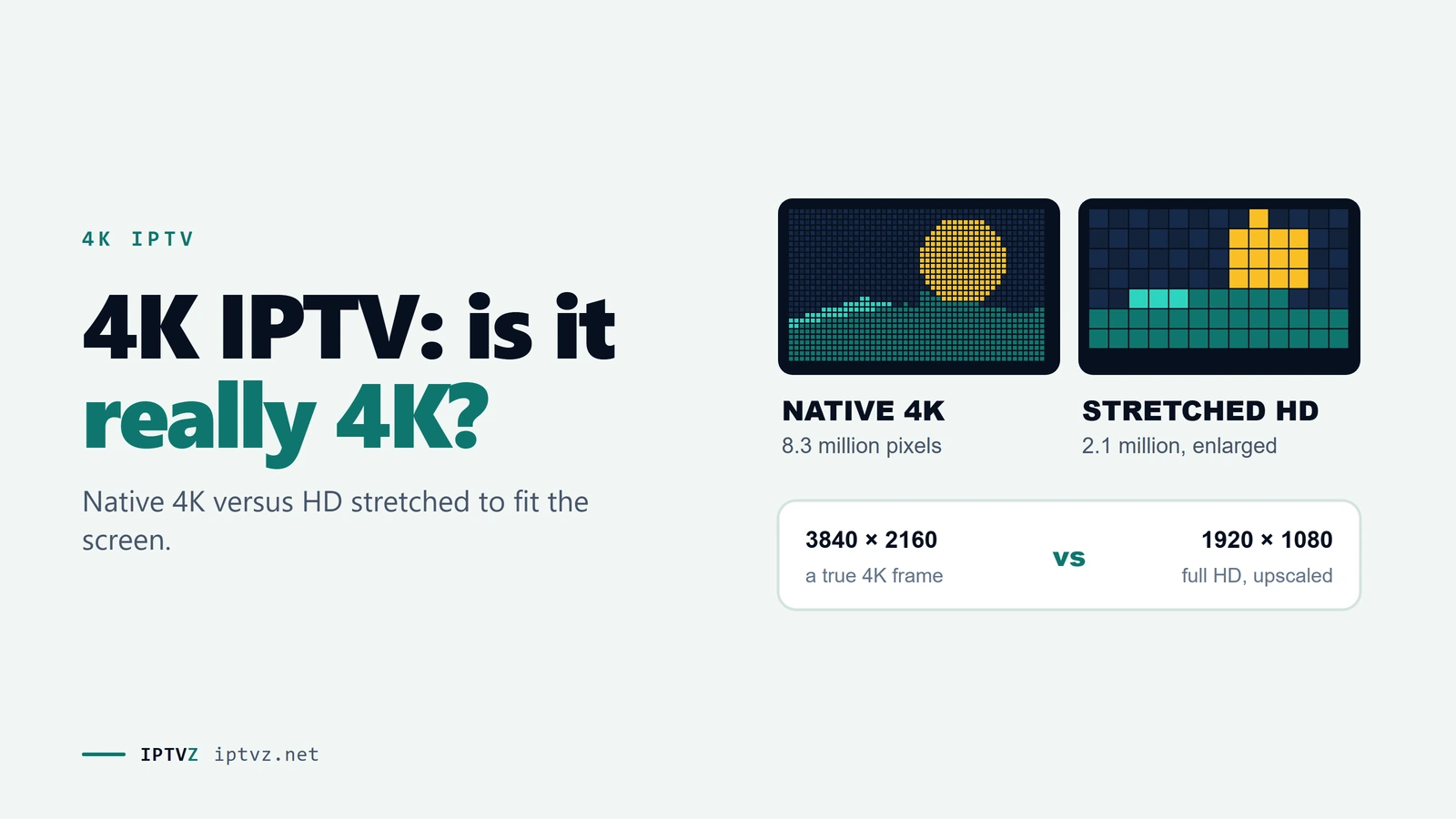
A 4K picture is 3840 pixels wide and 2160 tall, about 8.3 million pixels. Full HD, or 1080p, is 1920 x 1080, about 2.1 million. So 4K has four times the pixels, and that's where its extra sharpness can come from: fine detail such as blades of grass, faces in a crowd or small text.
The word to watch is "can". Extra pixels only add detail if the detail was there to begin with. When a 1080p picture is upscaled, or upconverted, each original pixel is simply spread over four. The image now has 4K's pixel count, and your TV and player will report 3840 x 2160, but it holds no more real detail than the 1080p original. Good upscaling looks smooth; it still can't invent what the camera never recorded.
The same patch of a game, upscaled from 1080p and in native 4K
There's a second thing often sold with 4K: HDR, or high dynamic range, which widens the range of brightness and color. HDR can be just as visible as the extra pixels. It's also separate from resolution, so a channel can be 4K without HDR, and HDR 1080p can look better than plain 4K.
Why so little live TV is really 4K
The limit is upstream of any IPTV seller. Most US TV channels are simply not sent out in 4K, and the ones that are often offer it only for some events, or don't film in it. Here's what the big names say about their own 4K:
- Fox. For its 4K NFL broadcasts in 2019, Fox planned to produce games in 1080p with HDR "and upconvert the image from there to 4K/HDR".
- ESPN. ESPN and ESPN2 began a 4K HDR rollout on September 8, 2026, for programming such as Monday Night Football, the NBA and the NHL, not all day. ESPN is moving its production to 1080p HDR, and "from there, ESPN can upconvert the signal to 4K", Sports Video Group reported.
- DIRECTV. Its help page lists two 4K channels, 105 and 106, with the same description for each: "occasional live sporting events".
- YouTube TV. Its 4K Plus add-on covers "certain live and on-demand programs", not the whole channel lineup.
Those are licensed services spending real money on 4K, and even they offer it for selected events. Why do broadcasters stop at 1080p? Disney's Dave Johnson described native 4K production as mainly a question of economics, because of the bandwidth and equipment it takes at scale.
How a 1080p game becomes a "4K" channel
None of this means upconverted 4K is a con. With HDR and a high bitrate, it can look clearly better than the regular HD channel. It just isn't the four-times-sharper picture the word suggests, and no IPTV service can add the missing detail on its way to you.
What "4K" means in an IPTV channel list
A channel name in an IPTV list is just text somebody typed, and nobody checks it. We counted how freely the word gets used: 68 of the 72 IPTV seller websites we read on October 30 and 31, 2026, mention 4K, and 21 go on to mention 8K. In practice, a "4K" entry can be any of these:
| What it is | Stream info says | Real detail |
|---|---|---|
| A 4K event filmed natively in 4K | 3840 x 2160 | True 4K, but rare |
| A broadcaster's upconverted 4K feed, such as big US sports | 3840 x 2160 | 1080p, often with HDR |
| A 4K scenery or "relax" channel | Varies | Can be true 4K, but not what most people want to watch |
| An HD channel upscaled further down the chain | 3840 x 2160 | HD at best, and it uses more bandwidth |
| An HD channel with "4K" in its name | 1920 x 1080 or lower | HD, whatever the name says |
| Movies and series on demand marked 4K | Varies by title | Depends on the file; check title by title |
Note the second column. Resolution alone can't always separate these, because an upconverted feed reports the same 3840 x 2160 as a native one. It does catch the worst case, the HD channel with a new name, in seconds. And some 4K channels only carry a picture during events.
What people found when they looked for real 4K
We read 61 Reddit threads that came up for 4K, 8K and internet speed searches on IPTV, without an account, on November 4 and 5, 2026. Most were about devices with "4K" in the name. In the 7 threads where someone was hunting for real 4K channels, 17 top-level answers said some version of the same thing: there isn't much.
- The source is the limit. The top answer in a thread from a US viewer looking for 4K sports (14 points): "US channels for the most part don't broadcast in 4k except specific events".
- Labels aren't trusted. "My experience is that all claims of 2K/4K are most likely a lie. Most 2K or 4K channels are only 1080p at best and quite often are only 720p."
- Real counts are small. One user's service "has only 16 4K/ UHD channels,and some are only for live sports when it airs". Another wrote: "No such thing as an all 4k server."
- HDR is rarer still. The top answer in a thread about HDR (11 points) said: "I only know 5 English language channels that are hdr".
- Some have stopped caring. A Brazilian user wrote that good 1080p feeds have so much bitrate you can hardly tell them from 4K, and an owner of an AI-upscaling box called that feature "not worth it".
One more useful point came up: a count of "4K channels" can mislead. A user warned that a high count means little if most of them are scenery "Relax" channels or in a language you don't understand. That's a fair test for any seller's 4K claim, including ours.
- Experienced users expect a short list of real 4K channels, mostly sports events, and treat every other 4K label with suspicion.
- Ask which 4K channels you would really watch, not how many there are.
How to check a 4K channel in two minutes
You don't need special tools. Most player apps can show the stream's technical details, usually from an info button during playback. Some show more than others; one TiviMate user wished the app would "display more info about the stream", so if yours shows little, try the same channel in another player.
What to look for in a player's stream info
- Read the resolution
Open the stream info during playback. If a "4K" channel shows 1920 x 1080 or lower, the label is wrong, and that's the end of the test.
- Look at the bitrate, if your app shows it
Netflix recommends 15 Mbps or more for 4K, which is a useful yardstick. A 3840 x 2160 stream at a few Mbps is being squeezed hard, and it will often look worse than a good 1080p channel.
- Watch something that moves
Find a wide shot of a game, with the crowd and a fast camera pan. Compression shows up as smearing and blocks in motion, and a good stream stays clean. Small on-screen text is another good test.
- Compare with the HD version
Switch to the normal HD channel with the same program. If you can't see a difference from where you sit, the 4K version isn't worth its extra bandwidth for you.
What you need at home for 4K IPTV
Everything in the chain has to support 4K, or the picture drops to a lower resolution or stutters. The weakest link decides.
| Link | What you need | Why |
|---|---|---|
| TV | A 4K TV, with HDR if you want it | A 1080p TV can't show 3840 x 2160 |
| Streaming device | A 4K device that decodes HEVC (H.265) | Older sticks and apps may not handle 4K streams smoothly |
| HDMI | A TV port with HDCP 2.2 and an HDMI 2.0 or newer cable | YouTube TV and DIRECTV list these for their 4K |
| Internet | About 25 Mbps free for each 4K stream | That's what YouTube TV and DIRECTV ask for; Netflix says 15 Mbps or more |
| Home network | Ethernet if you can, or strong 5 GHz Wi-Fi | A steady signal matters more than a big speed-test number |
If you're choosing hardware, see our guide to the best device for IPTV. For the numbers behind the internet row, see what internet speed IPTV needs. And if 4K channels stutter while HD plays fine, start with our IPTV buffering fixes: a 4K stream has much less room for a weak connection.
Is 4K IPTV worth it?
For most people, 4K shouldn't be the reason to pick an IPTV service. It's a nice extra for a few big events, not something you'll use all week.
- It's worth it if you have a large 4K TV, a good device and a steady connection, and you follow the sports that get 4K feeds. Big events with HDR can look noticeably better.
- It isn't worth it if you mostly watch news, local stations and cable channels. Those are HD, and no 4K label will change that.
- Don't pay extra for the word. A clean 1080p channel at 60 frames per second can beat a squeezed "4K" one, especially for sports. Your 4K TV already upscales HD for you.
- Treat 8K as a red flag. We explain why in our guide to 8K IPTV.
What matters more for the channels you watch all day is whether they keep playing at busy times, which is the subject of our guide to reliable IPTV.
What our own 4K category shows
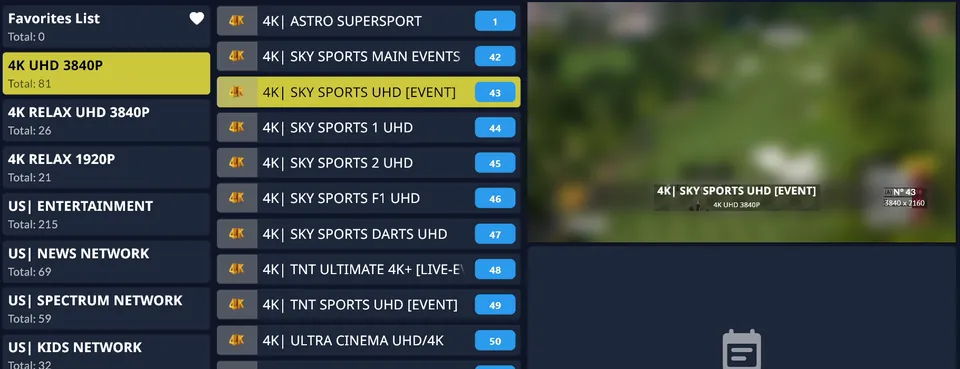
It's only fair to run this guide on ourselves. This is a frame from a short recording of our test on November 1, 2026. We blurred the broadcast picture, which isn't ours to show, and left the channel list and the player's readout as they were.
IPTVZ's 4K category in the player, November 1, 2026
| Check | IPTVZ |
|---|---|
| 4K category | "4K UHD 3840P": 81 channels, with names such as ESPN UHD, Sky Sports UHD and TNT Sports UHD |
| Relax channels | Two more categories: "4K Relax UHD 3840P" (26) and "4K Relax 1920P" (21) |
| Resolution test | Sky Sports UHD [Event] read 3840 x 2160 and played smoothly on Wi-Fi of about 25–50 Mbps in New York City |
| What we didn't test | We checked one channel in a short test, not all 81, and we can't tell you which feeds were filmed in native 4K |
| What isn't great | Some are event channels, several are non-US, and that channel's guide was blank |
| Trial | A free trial with no credit card, so you can check the channels yourself |
| If it doesn't work | A written 48-hour money-back guarantee for technical issues |
Look at the third category in that list: "4K Relax 1920P". 1920 is the width of a full HD picture, so that category carries a 4K name next to a number that points to HD. It's a good example of why you should read past the label, on our list as on anyone's. We won't claim our 4K category is all true 4K, because nobody selling IPTV can promise what the broadcaster didn't film.
People also ask
These are the questions Google showed for "best 4K IPTV" and "IPTV 4K channels" on November 5, 2026 (US settings, results not personalized). Each one gets a straight answer first.
Can you get 4K on IPTV?
Yes, if the channel is sent in 4K and your TV, device and internet can handle it. A stream can reach you at 3840 x 2160. But few live channels are 4K, and big US sports 4K feeds are usually upconverted from 1080p. Expect a short list of channels, mostly for events, rather than 4K across the board.
Which IPTV service offers 4K channels?
Most sellers say they do: 68 of the 72 seller websites we checked mention 4K. The claim alone tells you little, so don't compare channel counts. We sell IPTV, so we won't rank other sellers. Use a free trial to open the stream info on the 4K channels you'd really watch.
Which TV channels are available in 4K?
In the US, 4K is mostly offered for selected live sports rather than full-time channels. ESPN and ESPN2 show selected programming in 4K HDR, Fox has offered 4K for selected games, and DIRECTV's channels 105 and 106 carry "occasional live sporting events". Our guide to 4K channels in the US goes through them.
What is the best rated IPTV?
No official body rates IPTV services, so "best rated" usually comes from a seller or a paid list. Star ratings on a seller's own website aren't independent either. Our guide to IPTV reviews shows how to spot a paid review. For 4K, your own test tells you more than any rating.
Which IPTV is legal in the US?
IPTV itself is legal: it's just a way of delivering TV over the internet, and licensed services such as YouTube TV, Sling TV and Fubo use it. Whether a particular service is legal depends on whether it has the rights to the channels it streams. We don't claim licensing we can't verify. Our guide on whether IPTV is legal explains what US law covers.
More questions about 4K IPTV
Is ESPN in 4K on IPTV?
ESPN and ESPN2 started offering selected programming in 4K HDR in September 2026, and ESPN's 4K is upconverted from 1080p HDR. An IPTV list may show an ESPN UHD channel, but it can only be 4K when the source is.
Why does my 4K channel look blurry?
Usually because it's an HD picture stretched to 4K, or a 4K stream with too little bitrate. Open the stream info to check the resolution, then compare with the HD version of the channel. Your connection can also force the player to a lower quality.
Why do 4K channels buffer more than HD?
They carry much more data, so a dip that an HD stream rides out can freeze a 4K one. A 4K stream can need three or more times the bandwidth of 1080p: Netflix suggests 15 Mbps against 5 Mbps. If 4K stutters and HD doesn't, your connection or device is the likely limit.
Does IPTV have HDR?
Some 4K channels do, but few. HDR has to be in the source, and your device and TV have to support it. In a Reddit thread on the topic, the top answer could name only five English-language channels with HDR.
Can a Fire Stick play 4K IPTV?
A 4K model can, on a 4K TV with enough internet. A non-4K stick can't, and a weak Wi-Fi signal can hold back even a good one. Our guide to the best IPTV for Fire Stick covers the details.
Are movies on IPTV really in 4K?
Some are, but it depends on the file, so check title by title. On-demand 4K isn't limited by broadcasters the way live TV is, although a "4K" tag there can be just as loose as on a channel.
Is 8K IPTV real?
We know of no US TV channel that broadcasts in 8K, so treat any "8K IPTV" name as branding. 21 of the 72 seller websites we checked mention 8K anyway. Our guide to 8K IPTV explains the claim.
Sources and data
- IPTVZ, websites of 72 IPTV sellers found in Google for US buying searches: 533 pages saved and checked, US connection, October 30–31, 2026. Mentions of 4K and 8K counted by keyword. No purchases were made.
- IPTVZ, 61 public Reddit threads found for 4K, 8K and internet speed searches on IPTV, read without an account on November 4–5, 2026; answers in 7 threads looking for real 4K coded by hand. Users quoted without usernames; no sellers named.
- IPTVZ test: short recording of 4K playback, November 1, 2026, Wi-Fi of about 25–50 Mbps, New York City. One channel checked; broadcast picture blurred.
- IPTVZ, Google results and "People also ask" questions for "best 4K IPTV" and "IPTV 4K channels", US settings, collected November 5, 2026.
- Sports Video Group, Inside Fox Sports' Upcoming Season of 4K HDR Distribution of Thursday Night Football, September 20, 2019, read November 5, 2026.
- ESPN Press Room, ESPN, ESPN2 Coming to Sports Fans in 4K HDR in the U.S., September 8, 2026, read November 5, 2026.
Show all 12 sourcesShow fewer
- Sports Video Group, SVG Sit-Down: Disney's Dave Johnson on ESPN's New 4K HDR Distribution Pipeline, September 22, 2026, read November 5, 2026.
- DIRECTV, DIRECTV 4K UHD streaming FAQ, read November 5, 2026.
- YouTube TV Help, Get extra features with 4K Plus, read November 5, 2026.
- Netflix Help Center, Netflix-recommended internet speeds, read November 4, 2026.
- IPTVZ keyword research: Semrush US data for 4K IPTV searches, collected November 5, 2026.
- IPTVZ plans and refund policy as published on iptvz.net, November 5, 2026.
Test it on your own TV
Which IPTVZ plan is right for you?
Both plans carry the same channels, movies and sports, with the same 48-hour money-back guarantee. Pick one and order right here.
Standard
- 19,000+ live channels, including 830 US local stations
- 80,000+ movies & series on demand
- NFL, NBA, MLB, NHL & PPV events
- 24/7 support by chat & email
$29.99
$10.00/mo · billed once
VIP
- Everything in Standard, plus:
- Free Hot Player or EBO Player activation for 1 year
- Premium Server
- Faster, priority support
$44.99
$15.00/mo · billed once
Not ready to buy? Start a free trial, no credit card needed.
- 48-hour money-back guarantee for technical issues
- Pay by card, crypto, bank transfer, Cash App and more
- Up to 5 devices and plans up to 5 years on the pricing page
Sources
- sportsvideo.org: Inside Fox Sports' Upcoming Season of 4K HDR Distribution of Thursday Night Football sportsvideo.org
- espnpressroom.com: ESPN, ESPN2 Coming to Sports Fans in 4K HDR in the U.S. espnpressroom.com
- sportsvideo.org: SVG Sit-Down: Disney's Dave Johnson on ESPN's New 4K HDR Distribution Pipeline sportsvideo.org
- directv.com: DIRECTV 4K UHD streaming FAQ directv.com
- support.google.com: Get extra features with 4K Plus support.google.com
- help.netflix.com: Netflix-recommended internet speeds help.netflix.com

 Buying guides
 Buying guides
 Buying guides
Discover more
Explore our other guides & insights
From device setup guides to channel overviews: find everything you need to stream smarter.