

IPTV and VPN: Do You Need One in the USA?
Search "IPTV VPN" and almost every result is selling a VPN or earning a commission on one. So here's the view from a seller with nothing to gain: IPTVZ doesn't sell VPNs or earn from them. We read the largest study we could find on internet throttling, counted what 84 Reddit answers said, and checked what 72 IPTV sellers claim. The honest answer is more mixed than the ads suggest.
Who wrote this: IPTVZ sells IPTV, not VPNs. We don't recommend a VPN brand and earn nothing from any of them. We read public Reddit threads without an account and quote users without their usernames. We name no other seller.
The short answer: you don't need a VPN for IPTV, so test before you pay for one
You don't need a VPN to watch IPTV in the US. A VPN hides which servers you connect to from your internet provider and can get you around a block or a slowdown aimed at that traffic. It can't fix weak Wi-Fi or an overloaded IPTV service, it adds a detour that can cost speed, and some IPTV services refuse VPN connections. It doesn't make anything legal, either. Start without one. If channels buffer, test the same channel with a VPN on and off, and keep it only if it clearly helps.
The key point
A VPN changes the route your stream takes. If the route isn't your problem, a VPN can't help, and it may make things worse.
This guide is part of our series on finding the best IPTV service in the USA. If your stream is buffering right now, see whether a VPN stops buffering. Our guide to reliable IPTV covers the causes a VPN can't touch.
What a VPN actually changes for IPTV
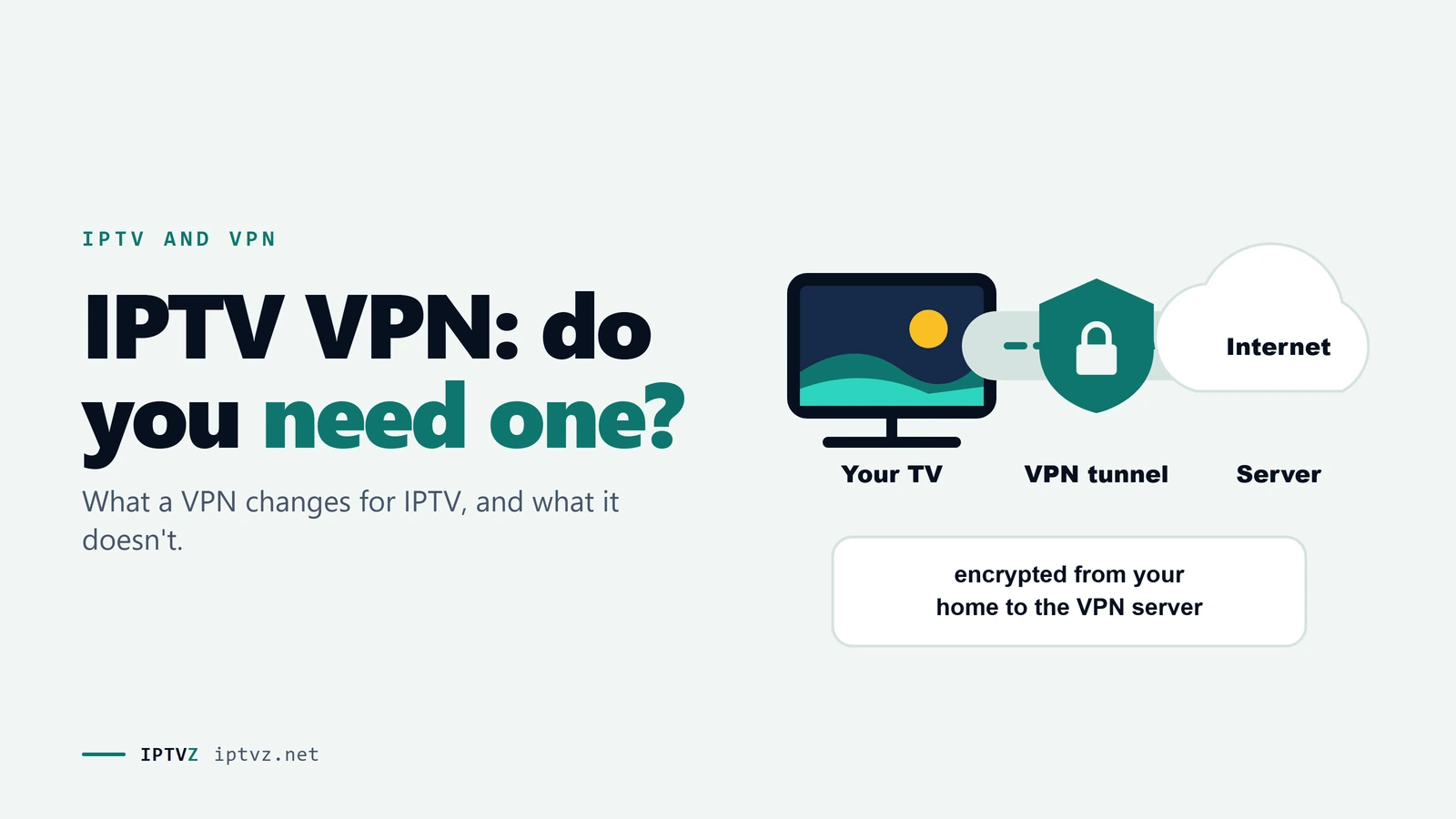
Normally your TV connects to the IPTV server through your internet provider, and the provider can see which server you're talking to. With a VPN, your device first builds an encrypted tunnel to a VPN server, and that server fetches the stream for you. Your provider sees a connection to a VPN. The IPTV service sees the VPN's address instead of yours.
The route your stream takes, with and without a VPN
| Who | Without a VPN | With a VPN |
|---|---|---|
| Your internet provider | The server you connect to, and how much data you use | A VPN connection, and how much data you use |
| The IPTV service | Your home IP address | The VPN server's IP address |
| The VPN company | Nothing | Your IP address and the server you connect to, so you're trusting it instead |
That last row gets left out of the ads. A VPN doesn't remove the need to trust someone. It moves that trust from your internet provider to a VPN company, which is why a VPN's owner and policies matter.
When a VPN helps, and when it hurts
| Your situation | Will a VPN help? | Why |
|---|---|---|
| Your provider blocks the IPTV server | Often | The block can't see the server through the tunnel |
| Your provider slows video it recognizes | Often | It can't recognize what's in the tunnel |
| You want your provider not to see the server | Yes | That's what the tunnel does |
| Weak Wi-Fi or a slow device | No | The problem is inside your home, and encryption adds work for the device |
| Your internet plan is too slow | No | A VPN can't add speed you don't have, and it usually takes some away |
| The IPTV service is overloaded | No | The problem is at the other end of the route |
| Your data cap has run out | No | Your provider still counts every byte |
For Wi-Fi, device and speed problems, go to our guide to internet speed for IPTV. For service problems, the fix is usually a better service, not a VPN.
What the research found about throttling
"Stop ISP throttling" is the main pitch for a VPN, so we went to the best evidence we could find: a 2019 study from Northeastern University and others, based on more than a million tests by 126,249 users of the Wehe app. It had enough data to judge 144 internet providers, and it found that 30 of them treated certain apps differently.
- Most providers showed nothing. The authors wrote that most providers they studied "do not deploy content-based differentiation", and they gave major US home broadband as an example, naming Comcast.
- In the US, it showed up on mobile networks and a few others. AT&T, Verizon, T-Mobile and Sprint were on the list, along with satellite and fixed-wireless names. The most common limit was 1.5 Mbps, well under what HD needs.
- Providers looked for names. The rules matched text such as "nflxvideo.com" for Netflix and "googlevideo.com" for YouTube.
- A VPN did get around it. In their tests on cellular plans, Netflix and YouTube mostly played at a higher resolution through a VPN.
Two limits matter here. The data is from 2018 and 2019, so it can't tell you what your provider does today. And the study couldn't see every kind of slowdown: the authors note that some providers may throttle "using methods other than content-based differentiation", such as by IP address or monthly data use.
It also didn't test IPTV. Our reading is that a rule hunting for Netflix's name wouldn't catch an unbranded IPTV server, but that's our inference, not a finding. The rules did change over time, and one HTTP rule looked for the word "video", which could catch a plain stream. We go through all of this in does a VPN stop IPTV buffering.
Blocking is a separate thing from throttling, and this study doesn't tell us how often providers block IPTV. For that, all we have is what users report.
What Reddit users and sellers say
On November 5, 2026, we read 56 Reddit threads about VPNs and IPTV without an account, nearly all from the past year. In four of them, someone asked outright whether IPTV needs a VPN, and we coded the 38 top-level answers. 19 said to use one, 11 said no, and 8 said it depends.
Does IPTV need a VPN? What 38 Reddit answers said
- It varies by provider and place. "It all depends on your isp. Some block and throttle it, some don't." Many of the block reports came from Canada and the UK, though that isn't a measured rate. Customers of the same Canadian provider gave opposite reports: one had buffering every evening, and another had "never had an issue".
- Mobile came up on its own. One user wrote: "I don't need it at home, but sometimes using my phone." That fits the research.
- Skeptics blamed the money. The top answer in one thread said the only reason people push VPNs "is so they can make money off their affiliate links".
- It doesn't rescue a bad service. "VPN + a bad IPTV service is still a bad IPTV service", as one user put it.
Sellers don't agree with each other either. Of the 72 IPTV seller sites we checked, 44 mention a VPN. At least 10 say you don't need one, and at least 10 include one or sell it as an add-on. A couple do both. When a seller warns you about throttling and offers a VPN at checkout, keep in mind that they make money on it.
Why a VPN can block your IPTV
This is the part VPN sellers skip. In nine Reddit threads, IPTV stopped working when a VPN was switched on, or got worse. We coded the 46 answers that gave a cause or a fix.
What 46 Reddit answers said when a VPN broke IPTV
Here's why each one happens, and what to try:
- The service blocks VPN addresses. VPN servers are shared by many people, so their addresses are easy to spot and block. "Two of my providers stop working when I use VPNs," one user wrote. Some services give out a separate link for VPN users, so ask yours.
- That VPN server is the problem. Try another server in your own country, then another protocol.
- A VPN setting is in the way. Users blamed the threat filters built into some VPN apps. Turn the filter off and test.
- Your IP address keeps changing. A VPN that rotates your IP can look like a second connection. One answer warned that this "will cause an extra connection" and can kick you off. Turn rotation off.
If channels play with the VPN off and fail with it on, you've found the cause. As one user asked a person with this problem: "If it works without a VPN why not just leave it off". Another user's stream buffered now and then with a VPN and was "almost flawless" with it off.
If you want a VPN, what to look for
We don't recommend a brand, and the "best VPN for IPTV" lists are mostly written for commission. Check these points instead:
- An app for your device
Fire TV and Android TV have VPN apps. Many Samsung and LG TVs don't, so you'd need a streaming stick or a router. See how to set up a VPN on a Fire Stick or box.
- Servers near you
Pick a server in your own country and close to home. A far-away one adds delay to every channel.
- Enough speed
You still need about 25 Mbps for 4K after the VPN takes its share. Measure on the device, with the VPN on.
- Split tunneling
This lets you send only your IPTV app through the VPN, so nothing else in your house slows down.
- A trial or refund
A VPN that works with one IPTV service may not work with another, so make sure you can test it. Free plans are usually a poor fit, for reasons we cover in free VPNs for IPTV.
Does a VPN make IPTV legal?
No. A VPN changes your route, not the law. Using a VPN is generally legal in the US, but it has no effect on whether what you're watching is legal. Any site that suggests otherwise is selling you something. We aren't lawyers, and we don't claim licensing we can't verify. Our guide to whether IPTV is legal covers what the law says.
Using a VPN with IPTVZ
IPTVZ works without a VPN, and we don't recommend a specific brand. Some customers choose one for privacy, and that's up to you. If you do use one, pick a US server close to you. If channels stop or buffer with it on, turn it off for a moment to see whether it's the cause, then contact us by live chat or email if you need help. You can see how the service runs on your own connection in a free trial.
People also ask
These are the questions Google showed for "IPTV VPN", "best VPN for IPTV" and "do I need a VPN for IPTV" on November 5, 2026 (US settings, results not personalized). Each one gets a straight answer first.
Does IPTV work without VPN?
Yes. IPTV runs over your normal internet connection, and a VPN isn't part of it. A few people need one because their provider blocks a server, but that depends on the provider and the service. IPTVZ works without a VPN.
Does VPN work for IPTV?
Usually, but not always, because some IPTV services block VPN addresses. It also depends on the server you pick. If channels fail with a VPN on, try a nearby server, then ask your service if it allows VPNs.
Which VPN is best for IPTV streaming?
We don't name one: the best one is whichever works with your service on your device. Look for an app for your device, nearby servers, split tunneling and a refund period, then test it on the same channel with the VPN on and off.
Is there a free VPN for IPTV?
Yes, but most free plans have data caps or other limits that don't suit live TV. An HD stream can use about 3.6 GB an hour. Our guide to free VPNs for IPTV explains the limits and the risks.
Why is my VPN blocking my IPTV?
Usually because the IPTV service blocks that VPN's address, or a VPN setting is filtering the stream. Try another nearby server and turn off any threat filter. If it still fails, ask your service whether it allows VPNs or has a separate link for them.
Should I use a VPN when watching IPTV?
Only if it solves a real problem or you want the privacy. Start without one. If channels buffer, compare the same channel with a VPN on and off at the same time of day. Keep it only if there's a clear difference.
How do I add a VPN to my IPTV?
Install the VPN's app on the device you watch on, connect to a nearby server, then open your IPTV app. On a TV with no VPN app, use a streaming stick or set the VPN up on your router. Our Fire Stick and box guide has the steps.
More questions about IPTV and VPNs
Do I need a VPN for IPTV on Firestick?
No. A Fire Stick runs IPTV apps without one. The same rules apply as on any device: use one if you have a specific reason, and test it. Our Fire Stick guide covers the setup.
Which server is best for IPTV?
If you mean a VPN server, one in your own country and close to you. A nearby server adds the least delay. If one fails, try another in the same area, because the IP addresses differ.
Does a VPN slow down IPTV?
It can. Your data takes a longer route and has to be encrypted, so a VPN usually costs some speed. How much depends on the server, the device and your connection. One Reddit user on gigabit fiber said they never got more than 50 Mbps with a VPN on.
Can my internet provider tell I'm using a VPN?
Usually, yes. It can see a connection to a VPN server and how much data you use, but not which server or stream is inside the tunnel.
Can I use DNS instead of a VPN?
Changing your DNS can help if a block works at the DNS level, and some Reddit users fixed theirs that way. It doesn't hide your traffic or get around a block on the server's address.
Sources and data
- Li, Niaki, Choffnes, Gill and Mislove, A Large-Scale Analysis of Deployed Traffic Differentiation Practices, ACM SIGCOMM 2019. Data from 2018 to January 2019.
- IPTVZ, 56 public Reddit threads about VPNs and IPTV, read without an account on November 5, 2026; 38 top-level answers in 4 threads on whether a VPN is needed and 46 in 9 threads where a VPN broke IPTV coded by hand. Users quoted without usernames; no sellers named.
- IPTVZ, websites of 72 IPTV sellers found in Google for US buying searches: 533 pages saved and checked, US connection, October 30–31, 2026. VPN mentions found by keyword and read by hand. No purchases made.
- IPTVZ, Google results and "People also ask" questions for "IPTV VPN", "best VPN for IPTV" and "do I need a VPN for IPTV", US settings, collected November 5, 2026.
- IPTVZ keyword research: Semrush US data for VPN searches, collected November 5, 2026.
Test it on your own TV
Which IPTVZ plan is right for you?
Both plans carry the same channels, movies and sports, with the same 48-hour money-back guarantee. Pick one and order right here.
Standard
- 19,000+ live channels, including 830 US local stations
- 80,000+ movies & series on demand
- NFL, NBA, MLB, NHL & PPV events
- 24/7 support by chat & email
$29.99
$10.00/mo · billed once
VIP
- Everything in Standard, plus:
- Free Hot Player or EBO Player activation for 1 year
- Premium Server
- Faster, priority support
$44.99
$15.00/mo · billed once
Not ready to buy? Start a free trial, no credit card needed.
- 48-hour money-back guarantee for technical issues
- Pay by card, crypto, bank transfer, Cash App and more
- Up to 5 devices and plans up to 5 years on the pricing page
Sources

 Buying guides
 Buying guides
Discover more
Explore our other guides & insights
From device setup guides to channel overviews: find everything you need to stream smarter.