

IPTV in Houston: How It Works, What It Costs and How to Start
IPTV in Houston means watching live TV over your home internet instead of cable, satellite or an antenna. You keep the Houston locals: ABC 13, CBS 11, FOX 26 and NBC 2. You also get Space City Home Network for the Astros and Rockets, plus the usual cable channels. It runs on a Firestick, a Smart TV or a phone. With IPTVZ, a 12-month plan costs $74.99, about $6.25 a month.
Houston viewers usually reach IPTV after one of two moments. Either the cable bill went up again, or ABC 13 disappeared from the antenna right before a game. Both problems have the same root cause: the TV signal arrives through a channel you do not control. I have set up IPTV for more than 1,500 customers over five years. Let's break down how IPTV changes that, what you need for it, and what it really costs in Houston.
IPTV in Houston at a glance
- What it is
- Live TV channels delivered over your internet connection and played in an app
- What you need
- About 15 Mbps per HD screen, a TV or streaming device, and a subscription
- Houston channels
- ABC 13, CBS 11, FOX 26, NBC 2, CW 39, My 20, Univision 45, Telemundo 47 and Space City Home Network
- What it costs
- IPTVZ from $29.99 for 3 months; $74.99 for 12 months. YouTube TV is $82.99 a month.
- Try it first
- Free 24-hour trial, no credit card needed, and a 48-hour money-back guarantee for technical issues
What is IPTV?
IPTV (Internet Protocol Television) is TV delivered as data over the internet. The channel is the same ABC 13 or ESPN you know. Only the route changes. Instead of a coaxial cable, a dish or an antenna, the picture travels through your router to an app on your TV.
The word covers more than one kind of service. In Houston, Phonoscope Fiber lists IPTV among its business solutions for apartment buildings, hotels and offices. In homes, IPTV usually means a subscription you watch in an app. That is what IPTVZ is, and what this guide is about. Our explainer on what IPTV is and how it works covers the technical side in more depth.
How IPTV works in a Houston home
IPTV works in three steps. The stream leaves the provider's servers, crosses your internet connection, and an app turns it back into a picture. What's actually happening here is simple. The channel's video is compressed into small data packets. Your player app collects them, puts them back in order and plays them a few seconds behind the live broadcast.
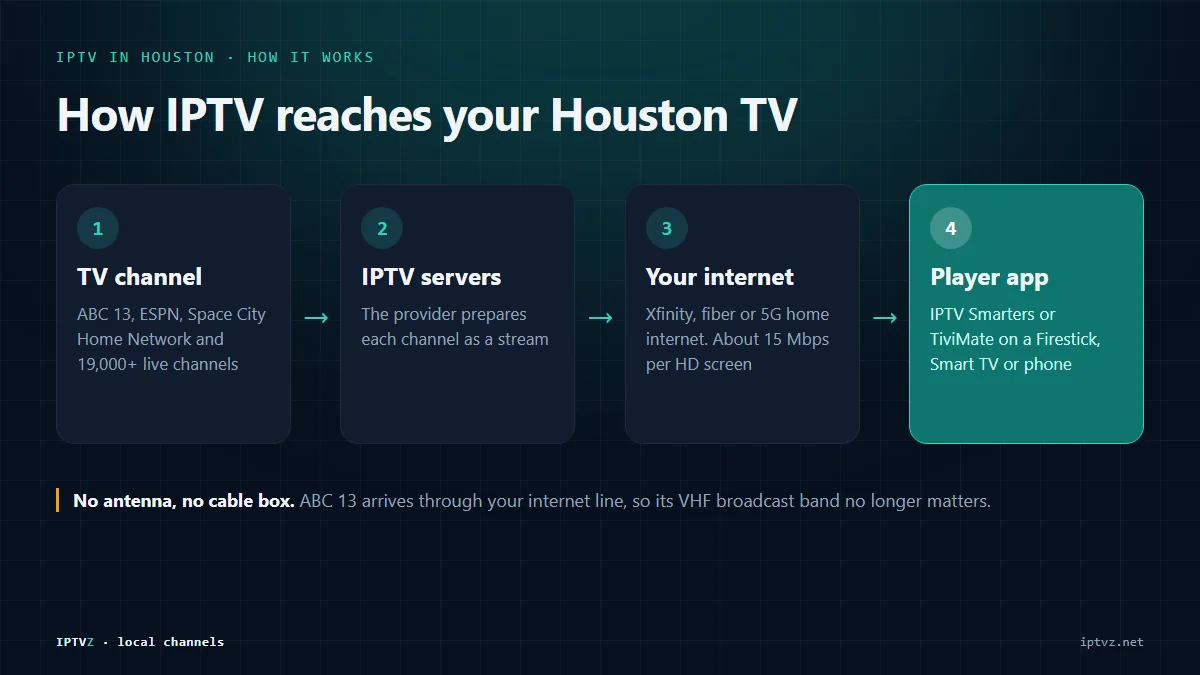
- The source. The provider receives each channel and prepares it for streaming.
- The route. The stream reaches your home over your normal internet, from Xfinity, a fiber provider or 5G home internet. No TV box from the cable company is involved.
- The screen. A player app on your Firestick, Smart TV or phone shows the channel, with a program guide that looks a lot like cable's.
From a technical perspective, this also explains the antenna problem many Houston viewers have. ABC 13 and CBS 11 broadcast on VHF, a band small indoor antennas often struggle with. Over IPTV, ABC 13 arrives through your internet line, so the broadcast band no longer matters. Our Houston TV stations guide shows which stations are VHF and why.
What you need for IPTV in Houston
You need three things: a steady internet connection, a device to watch on, and a subscription. Most Houston homes already have the first two.
Internet speed
Mbps (megabits per second) measures how much data your connection moves each second. Plan for about 15 Mbps per screen for HD and 25 Mbps for 4K. Two TVs streaming HD at the same time need roughly 30 Mbps, plus headroom for phones and laptops. For reference, Xfinity's Houston page lists 300 Mbps at $45 a month as a special offer. Its everyday price is $75 a month (checked October 17, 2026). Either number is far above what IPTV needs.
The root cause of most buffering is not the speed tier. It is Wi-Fi: a router two rooms away, behind a wall, competing with every phone in the house. If you can, connect the TV with an Ethernet cable, or move the router closer.
A device to watch on
| Device | What it costs | Setup guide |
|---|---|---|
| Amazon Fire TV Stick | Inexpensive; plugs into any HDMI port | Firestick IPTV setup |
| Samsung or LG Smart TV | Nothing extra if you already own one | Smart TV IPTV setup |
| Apple TV, iPhone or iPad | Nothing extra if you already own one | Apple IPTV setup |
| Android TV, Google TV or phone | Nothing extra if you already own one | Android IPTV setup |
You also need a player app. A player app is the program that plays the channels and shows the TV guide, such as IPTV Smarters or TiviMate. The app is the remote control; the subscription is the content.
Which Houston channels and teams you keep
With IPTVZ, Houston viewers keep the local stations, the Houston sports network and the cable channels. Those are the channels people usually pay cable for. These are in the IPTVZ lineup:
| What you watch | Channels on IPTVZ |
|---|---|
| Houston locals | ABC 13 (KTRK), CBS 11 (KHOU), NBC 2 (KPRC), FOX 26 (KRIV), CW 39 (KIAH), My 20 (KTXH), Houston PBS 8 (KUHT) |
| Spanish-language locals | Univision 45 (KXLN), Telemundo 47 (KTMD), UniMás 67 (KFTH) |
| Astros and Rockets | Space City Home Network |
| National sports | ESPN, ESPN 2, FS1, TNT, NFL Network, NFL RedZone |
| News and entertainment | CNN, Fox News, HGTV, Discovery and 19,000+ live channels in total |
| Spanish sports and TV | ESPN Deportes, TUDN, Galavisión |
You can check any channel by name in the full IPTVZ channel list before you sign up.
What IPTV costs in Houston, compared
A year of IPTVZ costs $74.99. A year of YouTube TV's main plan at its regular price costs $995.88. That difference is the main reason Houston viewers switch. Here is the full picture, with prices from each provider's own site on October 17, 2026.
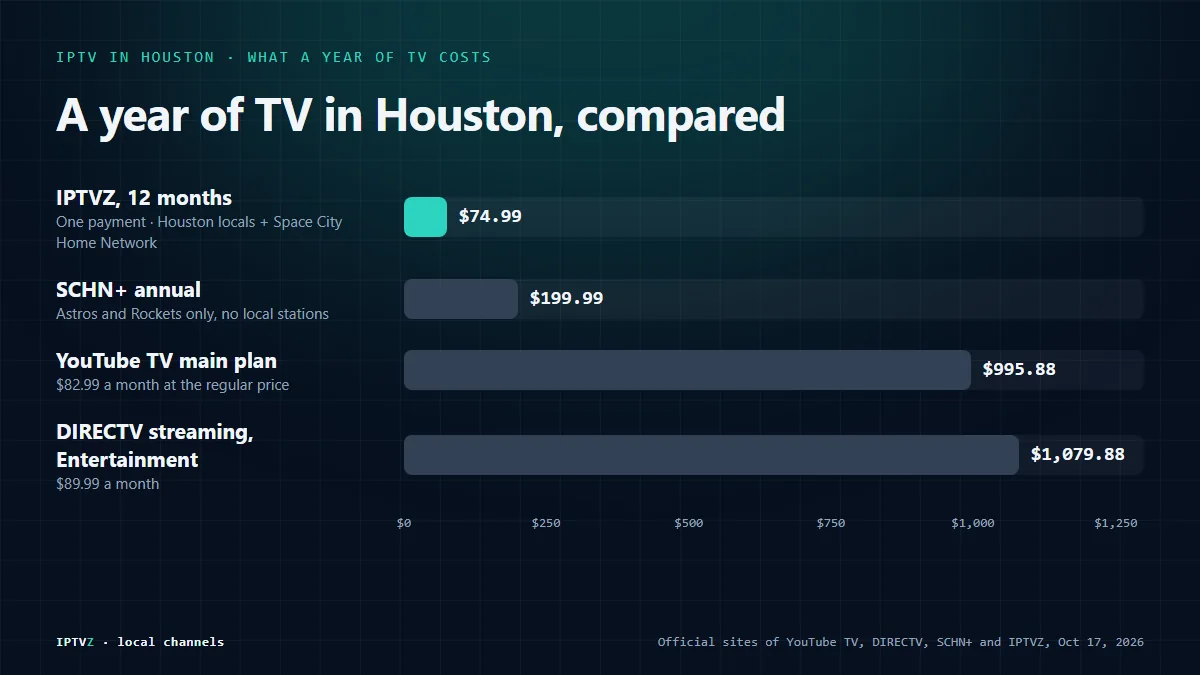
| Service | Price | Per year | Houston locals | Astros and Rockets |
|---|---|---|---|---|
| IPTVZ, 12 months | $74.99 once | $74.99 | Yes, all main stations | Yes, Space City Home Network |
| IPTVZ, 3 months | $29.99 once | About $120 if renewed | Yes | Yes |
| YouTube TV main plan | $82.99 a month ($59.99 for the first 2 months for new users, until November 16, 2026) | $995.88 at the regular price | Yes | Not on the network's provider list |
| DIRECTV streaming, Entertainment | $89.99 a month | $1,079.88 | Yes | Carried on DIRECTV streaming, per the network; check the package |
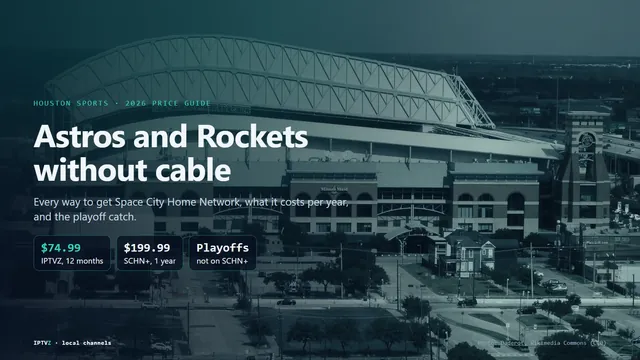
| SCHN+ (Astros and Rockets only) | $19.99 a month, $99.99 for 6 months or $199.99 a year | $199.99 | No | Yes |
| Xfinity NOW TV | $20 a month, requires Xfinity Internet | $240 plus internet | Not mentioned on Xfinity's NOW TV page | Not mentioned |
Sources: YouTube TV, DIRECTV, SCHN+ and Xfinity NOW TV, all checked October 17, 2026. Every option in the table needs a home internet connection, IPTVZ included.
Two honest caveats. YouTube TV and DIRECTV are large, established services with cloud DVR and polished apps, and some households value that. IPTVZ is the budget option: one payment, no contract, and the channels Houston viewers ask for. If you want to compare the cable side in detail, our guide to leaving Xfinity in Houston breaks down a typical bill.
Test it on your own TV first
Start a free 24-hour IPTVZ trial with no credit card. Check ABC 13, the Astros and your favorite channels on your own Wi-Fi. If you keep it, the 12-month plan is $74.99, about $6.25 a month.
Is IPTV legal?
IPTV as a technology is legal in the US. It is simply a way of delivering TV over the internet, and many licensed companies use it. What can make a particular service illegal is streaming channels without the rights to them. US law aims hardest at the people who run such services.
We explain the rules, with sources, in our guide to whether IPTV is legal in the USA. It does not rate any service as legal or illegal, ours included. It shows you how to check a service before you pay.
How to choose a trustworthy IPTV service
A trustworthy IPTV service lets you test before you pay and tells you who you are dealing with. Use this checklist on any provider, including us:
- A free trial. You should be able to test your channels on your own internet. IPTVZ offers 24 hours with no card.
- Written refund terms. Look for a clear policy. Ours is a 48-hour money-back guarantee for technical issues.
- A real company and real support. IPTVZ is run by IPTV LLC, registered in Wyoming, with live chat and email support at support@iptvz.net.
- A channel list you can search before buying. Ours is public on the channel list page.
- No "lifetime" deals. A one-time price for forever is a warning sign, not a bargain.
Our full IPTV buyer's checklist goes through each point.
How to start in about 10 minutes
- Request the free trial. Enter your email on the free trial page. Your login arrives by email.
- Install a player app on your Firestick, Smart TV or phone, using the matching guide above.
- Sign in with the details from the email, and give the program guide a few minutes to load.
- Test what matters to you. Open ABC 13, CBS 11, Space City Home Network and the channels you watch most, at the time of day you usually watch.
- Pick a plan if it works. Plans start at $29.99 for 3 months, and you pay once per period.
If something does not load during the trial, our IPTV troubleshooting guide walks through the usual causes, and support answers in live chat.
IPTV in Houston FAQ
- Is IPTV legal in the US?
- IPTV technology is legal in the US. What can make a service illegal is streaming content without the rights to it. Our guide to whether IPTV is legal explains the law with sources and shows how to check a service before you pay.
- What channels can I get on IPTV in Houston?
- With IPTVZ: the Houston locals ABC 13, CBS 11, NBC 2, FOX 26, CW 39 and My 20, Houston PBS 8, Univision 45, Telemundo 47 and UniMás 67, Space City Home Network, and national channels like ESPN, FS1, TNT, NFL Network, CNN and HGTV.
- Can I watch the Astros and Rockets on IPTV?
- Yes. Space City Home Network, the home of the Astros and Rockets, is in the IPTVZ lineup. On its own, the network's SCHN+ app costs $19.99 a month or $199.99 a year.
- How much internet speed do I need for IPTV?
- About 15 Mbps per HD screen and 25 Mbps for 4K. A wired connection or a router close to the TV matters more than a faster plan.
- Is IPTV going to be blocked?
- IPTV as a technology is not being blocked; licensed companies deliver TV this way every day. Enforcement in the US targets services that stream without the rights, which is why it pays to check a provider before you buy.
- Does IPTV work during a hurricane or power outage?
- IPTV needs power and a working internet connection, like YouTube TV or any streaming service. When the internet is down, it is down too. For storms, keep a battery radio or the ABC13 or KPRC 2+ news app on your phone's mobile data as a backup.
- Do I need cable to use IPTV?
- No. You need home internet from any provider, a device such as a Firestick or Smart TV, and an IPTV subscription. No cable TV package or box is involved.
- Which is the best IPTV service in Houston?
- The best one is the one that passes your own test. Use a free trial on your Wi-Fi, check your local channels and teams, and read the refund terms. IPTVZ offers a free 24-hour trial and a 48-hour money-back guarantee for technical issues.
The short version
- IPTV delivers live TV over your internet, so antenna and VHF problems disappear.
- You need about 15 Mbps per HD screen, a Firestick or Smart TV, and a subscription.
- IPTVZ carries the Houston locals, Space City Home Network and 19,000+ live channels.
- A year of IPTVZ is $74.99; a year of YouTube TV's main plan is $995.88 at the regular price.
Understand the setup first, then test it on your own screen. A free 24-hour trial takes a couple of minutes to start, and IPTVZ plans begin at $29.99 for 3 months.
Sources
- tv.youtube.com: YouTube TV tv.youtube.com
- directv.com: DIRECTV directv.com
- schnplus.com: SCHN+ schnplus.com
- xfinity.com: Xfinity NOW TV xfinity.com

Related articles
Discover more
Explore our other guides & insights
From device setup guides to channel overviews: find everything you need to stream smarter.